Soft-bodies
For a high-level overview of the methods behind our soft-body implementation, see our blog-post.
Rigid-bodies can't deform in any way, which is precisely what makes them cheap and easy to control. Soft-bodies, aka. deformable bodies, are made for everything that must bend, stretch, or squash: ropes, cloth, jelly, balloons, the chassis of a car denting on impact, etc. They live in the same world as the rigid-bodies and the colliders, and interact with all the other features of the engine with little to no restriction:
- Any kind of impulse joint can be attached to a soft-body through its soft frames, which allows the definition of links between two soft-bodies, between a soft-body and a rigid-body, or between a soft-body and a multibody.
- Deformable colliders, as well as rigid ones, can be attached to a soft-body, sensors included.
- A detailed mesh can follow the deformations of a coarser simulated lattice (skinning).
- Parts of a soft-body can be controlled kinematically.
- A soft-body can deform permanently (plasticity), and tear apart (tearing).
The Python bindings are 3D only: whenever the following sections mention 2D bodies (their triangle cells, the area they enclose, or the constructors existing only in 2D), only the 3D counterpart applies. Note that the particles and the elements of a soft-body are read as NumPy arrays, and can be given either as NumPy arrays or as sequences of tuples.
Definition of a soft-body
A rigid-body is a single moving frame: the position and the velocity of any of its points follow from one translation and one rotation. This is precisely what a deformable body can't be, because its parts must be able to move (somewhat) independently of each other. Instead, a soft-body is made of particles, aka. mass points, i.e., points without any orientation, each having 2 degrees of freedom in 2D and 3 in 3D. The more particles a body is made of, the more detailed its deformations can be, and the more expensive it is to simulate.
The particles are kept together by a lattice made of up to three kinds of elements:
- The particles are the only mandatory element, i.e., the positions the
SoftBodyBuilderis built from. They carry the mass and the velocity of the body. - The edges (
edges) connect two particles. The structural edges resist the stretching (and the compression) of the body, whereas the bending edges (bend_edges) and the dihedral constraints (dihedrals, 3D) resist its bending. - The cells (
cells) connect three particles in 2D (triangles) and four in 3D (tetrahedra). They resist the deformation of the area (2D) or of the volume (3D) they cover.
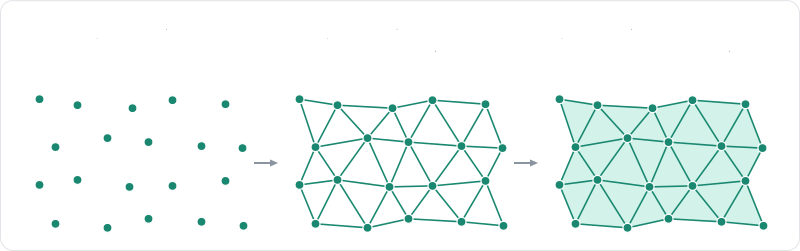
Two more concepts describe how the body interacts with the rest of the world. The surface
(surface) is the boundary of the body (segments in 2D, triangles in 3D): this is
what the body collides with, and what the preservation of its volume integrates over. A body without any surface, e.g.,
a cloud of particles, collides with nothing at all, unless it is given wire segments
(wire), in which case it collides as a polyline, which is what a 3D rope does.
Finally, a skin (skin) is a mesh which vertices follow the cells without being
particles themselves, as detailed in the skinning section.
Every element can be given manually to the soft-body builder, but the constructors of the next section build the lattices of the
most common shapes directly. The elements are given to these setters of the builder as NumPy arrays of particle indices, with one row per element (e.g., of shape (E, 2) for the edges and (C, 4) for the cells), or as sequences of tuples, and replace the elements generated by the constructor (see also add_edges). Note that the elements a body is made of decide which of the
cohesion models can hold it together.
Creation and insertion
A soft-body is described by a SoftBodyBuilder, which constructors build the lattice of the most common shapes (static methods of the SoftBody class, e.g., SoftBody.cloth):
| Constructor | Lattice |
|---|---|
SoftBodyBuilder(positions) | No element at all: only the given particles. |
SoftBody.rope | Structural and bending edges between the particles of a line. |
SoftBody.cloth, SoftBody.cloth_anisotropic, SoftBody.cloth_tube | Structural, shear and bending edges, with a triangle surface. |
SoftBody.cuboid | Tetrahedral cells filling a box. |
SoftBody.sphere | A closed surface preserving its volume, with dihedral bending constraints. |
SoftBody.trimesh | The vertices and edges of a triangle mesh, held by shape matching. |
SoftBody.volumetric, SoftBody.volumetric_with | Cells filling a closed mesh. |
Every constructor returns a SoftBodyBuilder, which setters return a modified copy of the
builder so they can be chained. These setters can also be given as keyword arguments of the constructors, e.g.,
SoftBody.rope(a, b, 20, particle_mass=0.1, pinned_particles=[0]).
The volumetric constructor is the one to use for an arbitrary solid: it fills a closed mesh (segments in 2D, triangles
in 3D, oriented outward) with cells of about the requested size. The interior of the mesh is triangulated by Delaunay
refinement in 2D, whereas in 3D every cell of a lattice the mesh reaches is kept whole: the result contains the mesh
instead of following it exactly, and its boundary is as blocky as its cells. The meshing parameters are spelled out by volumetric_with, which takes a VolumeMeshParameters: the size of the cells (cell_size), how much the cover is smoothed (cover_smoothing) and subdivided (cover_subdivisions) around the boundary, i.e., how closely it follows the mesh, and whether the surface alone is covered (enclosure set to MeshEnclosure.CRUST), leaving the interior empty. Both constructors raise a MeshConversionError if the mesh isn't closed, or encloses nothing at that cell size.
# Fill a closed, outward-oriented triangle mesh with tetrahedral cells of about 0.2 in size;
# this raises a `MeshConversionError` if the mesh isn't closed or encloses no volume.
vertices, indices = rp.Cuboid((0.5, 0.25, 0.25)).to_trimesh()
block = rp.SoftBody.volumetric(vertices, indices, 0.2).translated((-3.0, 1.0, 0.0))
block_handle = world.add_soft_body(block)

# The same, with the meshing parameters spelled out: the cover of the mesh is subdivided
# once around its boundary, then smoothed, so it follows the mesh more closely.
params = rp.VolumeMeshParameters(0.2, cover_subdivisions=1, cover_smoothing=4)
smooth_block = rp.SoftBody.volumetric_with(vertices, indices, params)
smooth_block_handle = world.add_soft_body(smooth_block.translated((-3.0, 2.0, 0.0)))
The builder allows the definition of everything else that is specific to one soft-body: the particles held in place (the
pinned particles, pinned_particles), the softness of its constraints
(softness), the mass of its particles (one mass for every particle with
particle_mass, a total mass for the whole body with
mass, or one mass per particle with
masses), their radius
(particle_radius), the collider its surface is made of, and whether that
surface is allowed to collide with itself (self_contacts). The particles
can also be given a linear damping (linear_damping), a gravity scale
(gravity_scale), a dominance group
(SoftBodyParticleSettings.dominance_group, given with particle_settings), and be allowed to sleep or
not (can_sleep), exactly like a rigid-body. Inserting the
soft-body into the world (PhysicsWorld.add_soft_body) will
automatically create the rigid-body standing for it (its root body), as well as the
colliders covering its surface:
# A world with a ground.
world = rp.PhysicsWorld(gravity=(0.0, -9.81, 0.0))
world.add_collider(rp.Collider.cuboid(10.0, 0.1, 10.0))

# Builder for a rope of 20 particles between two points.
_ = rp.SoftBody.rope((0.0, 3.0, 0.0), (2.0, 3.0, 0.0), 20)
# Builder for a cloth: `nu` by `nv` particles, particle `(i, j)` at `origin + i * du + j * dv`.
_ = rp.SoftBody.cloth((-1.0, 2.0, -1.0), (0.1, 0.0, 0.0), (0.0, 0.0, 0.1), 20, 20)
# Builder for a box of `nx * ny * nz` particles filled with tetrahedral cells.
_ = rp.SoftBody.cuboid((3.0, 1.0, 0.0), (0.5, 0.5, 0.5), 4, 4, 4)
# Builder for a hollow sphere holding its volume (a balloon).
_ = rp.SoftBody.sphere((0.0, 3.0, 3.0), 0.8, 2)
# Builder over raw particle positions; the elements are added by the setters.
_ = rp.SoftBodyBuilder([(0.0, 3.0, 0.0), (1.0, 3.0, 0.0)]).edges([(0, 1)])
n = 20
cloth = (
    rp.SoftBody.cloth((-1.0, 2.0, -1.0), (0.1, 0.0, 0.0), (0.0, 0.0, 0.1), n, n)
    # Particles held in place.
    .pinned_particles([0, n - 1, n * (n - 1), n * n - 1])
    # A uniform softness (natural frequency in Hz, damping ratio) for every constraint.
    .softness(rp.SpringCoefficients(30.0, 1.0))
    # The mass of each particle.
    # Default: 1.0
    .particle_mass(0.05)
    # The thickness of the particles, for collisions.
    # Default: 0.01
    .particle_radius(0.02)
    # The template of the body's colliders: its shape is replaced by the deformable surface.
    .surface_collider(rp.Collider.ball(0.05).friction(0.8))
    # Whether the surface collides with itself.
    # Default: False
    .self_contacts(True)
    # Whether the body may fall asleep.
    # Default: True
    .can_sleep(True)
)
# The setters can also be given as keyword arguments of the constructors.
_ = rp.SoftBody.rope((0.0, 3.0, 0.0), (2.0, 3.0, 0.0), 20, particle_mass=0.1, pinned_particles=[0])
# Insert the soft body: this creates its hidden root rigid body and its colliders.
cloth_handle = world.add_soft_body(cloth)
The collider given to SoftBodyBuilder.surface_collider is
only a template: its shape is replaced by the deformable surface of the soft-body, and its density is ignored, whereas
all its other properties are kept. Therefore this is where the friction, the collision
groups, or the active events of
the soft-body must be set. A body that should only collide through colliders of your own can be built without any
default one (no_surface_collider).
Two builders can be merged into a single soft-body with append, and their pieces
sewn together with additional edges (add_edges), which rest length is the distance
their particles have when they are added. This is, e.g., how the sleeves of a shirt are attached to its body.
Soft-body set
Like the rigid-bodies and the colliders, the soft-bodies of a simulation are stored inside of a set: the SoftBodySet,
given by PhysicsWorld.soft_bodies. The examples of this page use the PhysicsWorld, which owns all the sets of one
simulation, but the sets can also be used directly (a PhysicsPipeline then simulates the soft-bodies of the set given
as its soft_bodies argument). Note that the insertion of a soft-body (SoftBodySet.insert) needs the rigid-body set
and the collider set as well, because a soft-body owns the rigid-body standing for it and the colliders of its surface:
# The sets can also be used directly, without the `PhysicsWorld` façade.
soft_body_set = rp.SoftBodySet()
rigid_body_set = rp.RigidBodySet()
collider_set = rp.ColliderSet()
rope = rp.SoftBody.rope((0.0, 3.0, 0.0), (2.0, 3.0, 0.0), 20)
rope_handle = soft_body_set.insert(rope, rigid_body_set, collider_set)
soft_body = soft_body_set[rope_handle]
assert soft_body.num_particles == 20
# The state of the body as a whole.
print("Mass:", soft_body.mass, "center of mass:", soft_body.center_of_mass)
print("Sleeping:", soft_body.is_sleeping)
# Every soft body of the set.
for handle, soft_body in soft_body_set:
    print(handle, soft_body.num_particles)
The set supports len(), in, indexing by a SoftBodyHandle, and iteration over (handle, soft_body) pairs. The
SoftBody objects it gives are live views: reading or modifying one of them reads or modifies the soft-body stored in
the set, and using one of them after its soft-body was removed raises an InvalidHandle error. On the other hand, the objects describing its particles, elements, and
clusters (e.g., the SoftBodyParticle given by particle) are snapshots, which don't follow the simulation.
The state of the body as a whole can be read at any time as well: its number of particles (num_particles), its total
mass (mass), its mass-weighted center of mass (center_of_mass), the volume it currently encloses and its rest value
(volume, rest_volume), and whether it is sleeping (is_sleeping, see also wake_up). A soft-body can also be
disabled until it is enabled again with set_enabled. Conversely, the soft-body a rigid-body stands for (its
root body, or the proxy of one of its clusters) is
given by the soft_body property of that RigidBody, which is None for any other rigid-body.
Keeping the body together
Rapier supports three ways of holding the particles of a soft-body together: shape matching, constraints, and the Finite Elements Method (FEM). They can be combined, e.g., shape matching on top of edge constraints. Note that shape matching works on the particles alone, whereas the constraints need edges or cells, and the FEM solver needs cells.
Shape matching
Shape matching doesn't need any element. At each timestep, the rest shape of the body is placed where it best fits its current shape, i.e., both shapes are given the same center of mass, and the rest shape is given the rotation bringing its particles the closest to the current ones. Each particle is then pulled toward its twin in that matched rest shape by a spring:
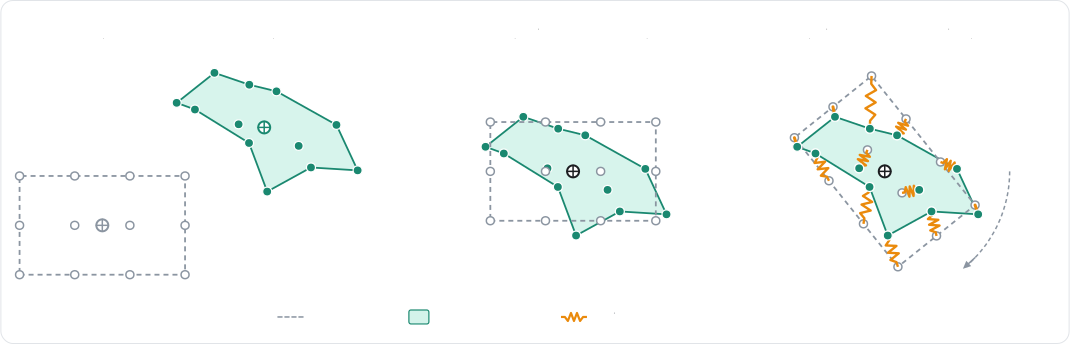
This is cheap, and a body always recovers its original shape whatever the deformation it went through. On the other
hand, the particles don't interact with their neighbors: pushing on one particle doesn't pull the ones around it, which
makes the deformations feel very local. Shape matching is enabled by
SoftBodyBuilder.shape_matching, and the strength of its
springs is the shape matching softness (shape_matching_softness)
of the material:
# A cloud of particles without any element: shape matching alone pulls them back toward
# their rest shape, placed where it best fits the current one.
points = 0.3 * np.array([(i % 3, i // 3 % 3 + 4.0, i // 9) for i in range(27)])
blob = (
    rp.SoftBodyBuilder(points)
    .shape_matching(True)
    .material(
        rp.SoftBodyMaterial(
            # How fast the particles are pulled back toward their rest shape.
            shape_matching_softness=rp.SpringCoefficients(5.0, 1.0),
        )
    )
    .particle_radius(0.1)
)
blob_handle = world.add_soft_body(blob)
Use shape matching for low-detail deformations, or whenever computing a topology (edges, cells) isn't desired. It is
enabled by default by the trimesh constructor. Note however that it performs very poorly for ropes,
cloth, or any open shape. Also note that combining it with edges makes the deformations spread to the neighbors to look
more realistic.
Constraints
The constraints-based soft-body solver is the default solver (SoftBodySolver.CONSTRAINTS), and the most versatile one:
every edge and cell element of the deformation lattice becomes a constraint, solved together with the contacts and the joints of the scene.

An edge is a spring-damper pulling its two particles back toward its rest length. A cell is either a volume constraint
keeping its area or its volume, the shape itself being held by the edges, or an elastic element resisting any
deformation. This is selected by the cell model of the body
(cell_model, which takes a SoftBodyCellModel):
VOLUME: one constraint per cell keeping its area (2D) or its volume (3D) at its rest value. This is the cheapest model, and combined with the edges it is often enough to obtain a convincing jelly.COROTATIONAL: linear elasticity expressed in the rotation-free frame of the cell. It is stable at any stiffness and recovers from inverted cells.NEO_HOOKEAN: stable Neo-Hookean hyperelasticity. It feels stiffer than linear elasticity on compression, but softer on tension.
The stiffness of every element is configured by the SoftBodyMaterial of the body, which can be given to the builder or
set at any time with the material property of SoftBody. This property is a live view of the material of the body: modifying one of its fields modifies the body, whereas SoftBodyMaterial.copy gives a detached copy. A material is created with the SoftBodyMaterial constructor, which takes any of its fields as keyword arguments, or with SoftBodyMaterial.uniform which gives the same softness to every constraint. The edges and the volume constraints are given a softness, i.e., a
natural frequency (in Hz) and a damping ratio instead of a stiffness, so it doesn't depend on the masses of the
particles:
- The edge softness (
edge_softness) for the structural edges; - The bend softness (
bend_softness) for the bending edges and the dihedral constraints; - The volume softness (
volume_softness) for the volume constraints.
The elastic cells are given a Young modulus (young_modulus, in force per unit
area in 3D, per unit length in 2D), a Poisson ratio (poisson_ratio), and a
damping ratio (elastic_damping_ratio) instead. Their natural frequency
is derived from these, therefore a body meshed more finely doesn't become stiffer, whereas it becomes more expensive to
simulate.
Finally, a body with a closed surface can preserve the area (2D) or the volume (3D) it encloses
(volume_preservation, or enable_volume_preservation after the insertion), which target can be scaled by a
volume_factor (or the volume_factor property of SoftBody after the insertion)
greater than 1 in order to inflate the body, e.g., to simulate a pressurized blob:
# Elastic cells: a jelly cube with corotational linear elasticity.
jelly = (
    rp.SoftBody.cuboid((3.0, 1.0, 0.0), (0.5, 0.5, 0.5), 4, 4, 4)
    # The constitutive model of the cells: `VOLUME` (per-cell volume constraints,
    # the shape is held by the edges), `COROTATIONAL` or `NEO_HOOKEAN`.
    .cell_model(rp.SoftBodyCellModel.COROTATIONAL)
    .material(
        rp.SoftBodyMaterial(
            # Stiffness of the elastic cells.
            young_modulus=2.0e3,
            poisson_ratio=0.35,
            elastic_damping_ratio=0.5,
            # Plasticity: the rest shape flows past 5% strain, at 20 per second.
            plastic_yield=0.05,
            plastic_creep=20.0,
            # Tearing: an element past 40% strain tears.
            tear_strain=0.4,
        )
    )
    .particle_mass(0.2)
)
jelly_handle = world.add_soft_body(jelly)

# A material shared by the edges, bending constraints and volume constraints.
material = rp.SoftBodyMaterial.uniform(rp.SpringCoefficients(30.0, 1.0))
# Softness of the bending constraints, on top of a uniform 30 Hz softness.
material.bend_softness = rp.SpringCoefficients(3.0, 1.0)
world.soft_bodies[cloth_handle].material = material
# The `material` property is also a live view: its fields can be modified in place.
world.soft_bodies[cloth_handle].material.deformation_damping = 0.1
The stiffness effectively simulated by the constraints solver depends on its convergence: with too few iterations, a stiff
body looks softer than its material says. This is why soft-bodies are configured with 3 additional internal PGS solver iterations by default, which can
be modified with
additional_pgs_iterations. The whole island a body belongs to
can also be given additional substeps with
additional_solver_iterations, just like
rigid-bodies.

The following table gathers the settings to look at for the most common problems:
| Problem | What to change |
|---|---|
| The body is too soft, or stretches too much. | Raise the natural frequency of the material's edge_softness, or its young_modulus for the elastic cells. Give it more additional_pgs_iterations, or switch it to the FEM solver with solver. |
| A cloth stretches, but should still fold easily. | Keep a stiff edge_softness, and give it a soft bend_softness. |
| A rope compresses like a spring. | Make its edges resist stretching only with tension_only. |
| The body keeps wobbling after an impact. | Raise the damping_ratio of the material's softnesses and its elastic_damping_ratio, or its deformation_damping (which damps the deformations but not the motion of the body as a whole). |
| A closed body collapses, or must be inflated. | Enable volume_preservation, and give it a volume_factor greater than 1. |
| The deformations are too local. | Combine shape_matching with edges, or rely on edges and cells alone. |
FEM solver
The FEM solver (SoftBodySolver.FEM, given to the builder with solver, or to the solver property of SoftBody after the insertion) resolves the elasticity of the whole body at once and semi-implicitly:
the forces and the stiffness of every cell are assembled into a single linear system, solved at each substep. Therefore
the stiffness of the body no longer depends on the number of solver iterations, which makes it capable of simulating
very stiff materials, as well as more realistic plastic deformations and failures:
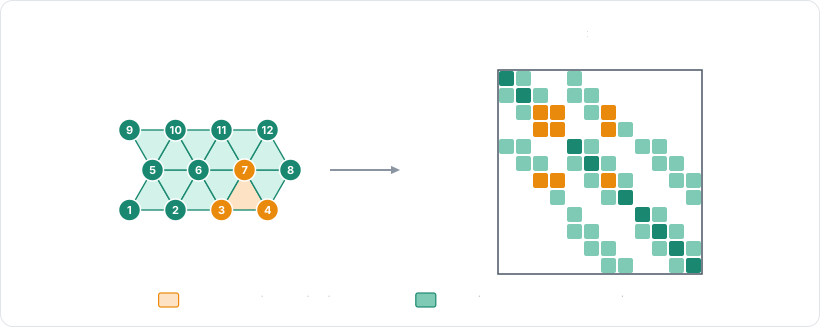
This comes at a price: the system is factorized at each timestep, and every constraint touching the body (contacts,
joints) needs a solve against it. Note that the FEM solver requires cells, so it only applies to the bodies built with
cells, e.g., with the cuboid, volumetric, or volumetric_with constructors. The configuration of its linear solves is shared
by every body using it, and lives in the integration parameters:
# A stiff beam simulated by the FEM solver: its stiffness doesn't depend on the number of
# solver iterations.
beam = (
    rp.SoftBody.cuboid((0.0, 2.0, -3.0), (1.0, 0.1, 0.1), 11, 3, 3)
    .solver(rp.SoftBodySolver.FEM)
    .cell_model(rp.SoftBodyCellModel.NEO_HOOKEAN)
    .material(rp.SoftBodyMaterial(young_modulus=1.0e5, poisson_ratio=0.3))
    # The particles of the face at `x = -1` are the first 3 × 3 ones.
    .pinned_particles(range(9))
)
beam_handle = world.add_soft_body(beam)

# The tuning of the linear solves of the FEM solver, shared by every body using it.
fem = world.integration_parameters.soft_bodies.fem
fem.linear_tolerance = 1.0e-5
fem.max_linear_iterations = 20
The linear solves stop at the relative residual
linear_tolerance, or after
max_linear_iterations conjugate-gradient iterations,
whatever the residual. The bodies with at most
max_dense_dofs degrees of freedom (600 by default) are
factorized directly, whereas the larger ones rely on the iterative conjugate gradient.
Use the FEM solver for stiff materials which simulated stiffness must not depend on the iteration count, e.g., the chassis of a car or a metal beam. This also results in more realistic plasticity and tearing.
Contacts and self-intersections
A soft-body collides through the collider covering its surface, which is a deformable triangle-mesh (a polyline in 2D) built from the template given to the builder.
Thickness
The radius of the particles
(SoftBodyBuilder.particle_radius) is
the thickness of the soft-body wrt. collision-detection: it is the contact skin of its surface collider, i.e., the
distance kept between the surface and the objects touching it, as well as the distance the solver bounds the motion of
one particle by at each substep. A radius that is too small relative to the distance between two neighboring particles
may let thin objects pass through the surface, whereas a radius larger than that distance will make the body collide
with itself even when it is at rest. Therefore it is recommended to keep it well below the distance between two
neighboring particles. Note that every constructor picks a sensible default, i.e., about half the length of its edges
or of its cells.
Oriented surfaces and shells
A closed surface (a balloon, a jelly cube, a filled polygon) is oriented: its contacts are generated on its outward
side only, like for an oriented triangle-mesh, so nothing is held
inside it. An open surface (a rope, a cloth) is two-sided, because a body arriving from either side must be stopped.
This is what the builder does by default, and it is what a solid body wants. A shell, i.e., a closed surface which
inner side must hold the bodies contained in it, is obtained by asking for a surface that is not oriented
(SoftBodyBuilder.oriented):
# A shell: a closed surface that is not oriented, so its inner side holds the bodies put
# inside it (a bowl, a box, a container). A closed surface is oriented by default.
bowl = rp.SoftBody.sphere((-3.0, 2.0, 0.0), 0.8, 2).oriented(False).softness((60.0, 1.0))
bowl_handle = world.add_soft_body(bowl)
After the insertion, the shape of the surface collider (given by SoftBody.collision_mesh().collider) is
the authority: the flag is changed there, like for any other collider (i.e., by assigning to its shape a triangle-mesh with the TriMeshFlags.ORIENTED flag toggled).
Self-contacts
A soft-body doesn't collide with itself by default. Self-contacts are enabled by
SoftBodyBuilder.self_contacts,
which makes the vertices and the edges of the surface collide with the surface of their own body: this is what keeps
a cloth folding onto itself, or a jelly squashed against itself, from passing through itself. Note that they are more
expensive, since the whole surface must be tested against itself.
Penetrations and tangles
The contacts between two meshes are computed triangle by triangle (segment by segment in 2D), without any notion of their interiors. As long as the two surfaces don't penetrate, this works well. But as soon as they do, some of these local contacts start pointing the wrong way, and actively keep the two surfaces in their penetrating state instead of separating them. Deformations make it worse, since a single surface can also cross itself and end up tangled:
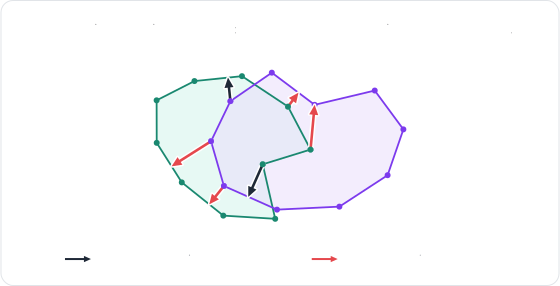
Rapier handles these configurations by measuring the volume of the overlap between the two surfaces. The gradient of that volume gives a good approximation of the direction separating the two bodies, aka. the volume normal, which is used both to push the overlapping regions apart, and to correct the direction of the local contacts inside them:
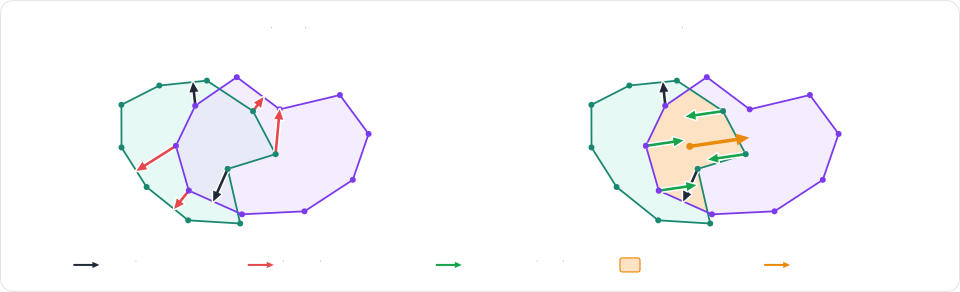
This is enabled by default for the closed surfaces, against other soft-bodies as well as against rigid colliders.
It is configured, along with the detection and the recovery of the tangled configurations, by the recovery settings of
the global settings
(IntegrationParameters.soft_bodies.recovery).
Every mechanism can be switched off individually, and the table below lists the ones to look at for the most common
problems:
| Problem | What to change |
|---|---|
| Thin or fast objects pass through a surface. | Raise the particle radius (particle_radius). Let the body request more substeps while it is hit fast (max_extra_substeps). |
| Two bodies crossing corner-first don't collide. | Enable edge_speculation (note that it can leave pressed 3D piles crossed). |
| A body stays tangled with itself. | Keep self_stand_down enabled (the default), which lets the elasticity untangle it, or push the crossed features apart with crossing_repulsion. |
| The recovery from a penetration is too slow, or too violent. | Change the recovery_pace, i.e., the corrective speed allowed to the recovery (in length units per second). |
| Soft contacts feel too spongy. | Raise the contact_stiffening of the soft-body contacts relative to the rigid ones. |
| The overlap of two bodies isn't resolved at all. | Make sure both surfaces are closed: the intersection-volume constraints (overlap_constraints) only apply to them. |
Soft frames: joints and rigid colliders
Joints and rigid colliders both need a frame to be attached to, i.e., a translation and a rotation, which a soft-body
doesn't have. This is what soft frames are for: a soft frame is a rigid-body of type
RigidBodyType.SOFT_FRAME (see RigidBody.is_soft_frame) which pose is computed at each timestep
from a set of particles, by shape-matching. Since it is an ordinary rigid-body, every API working with rigid-bodies
works with it too: impulse joints of any kind (fixed, revolute, prismatic, generic, etc.) can be
attached to it, as well as rigid colliders (sensors included), and its position can be read at any time. Therefore a
soft-body is linked to another soft-body, to a rigid-body, or to a multibody
exactly the same way two rigid-bodies are.
The root body
Every soft-body is created with one soft frame covering all of its particles: its root body. It is the rigid-body
given by SoftBody.root_body. A
joint attached to it acts on the soft-body as a whole, and so does a force or an impulse applied to it. It also stands
for the soft-body in the islands, and it is the parent of the colliders the engine built for the body's surface (a
deformable collider bound to another cluster has the proxy of that cluster as its parent
instead). The soft-body a collider belongs to is given by Collider.deformable_mesh_ref, which is how a collider reported by a
scene query or by a collision
event is traced back to the body it
covers.
# The rigid body the engine created for the whole soft body, read back after its insertion.
root = world.soft_bodies[jelly_handle].root_body
assert world.rigid_bodies[root].is_soft_frame

# A rigid collider attached to it follows the frame of the whole body: here a sensor
# detecting what comes close to the jelly.
sensor = world.add_collider(rp.Collider.ball(1.0).sensor(True), parent=root)

# A joint attached to it acts on the soft body as a whole: this one hangs the jelly under a
# fixed anchor by a spring.
anchor = world.add_body(rp.RigidBody.fixed(translation=(3.0, 4.0, 0.0)))
world.impulse_joints.insert(anchor, root, rp.SpringJointBuilder(2.5, 60.0, 2.0))
The pose of the root body is recomputed from the particles at each timestep, therefore moving it has no effect. Removing it is not a no-op though: like any cluster proxy, it takes its cluster with it, i.e., the whole soft-body, unless another cluster covers some of its particles (see removal).
Clusters
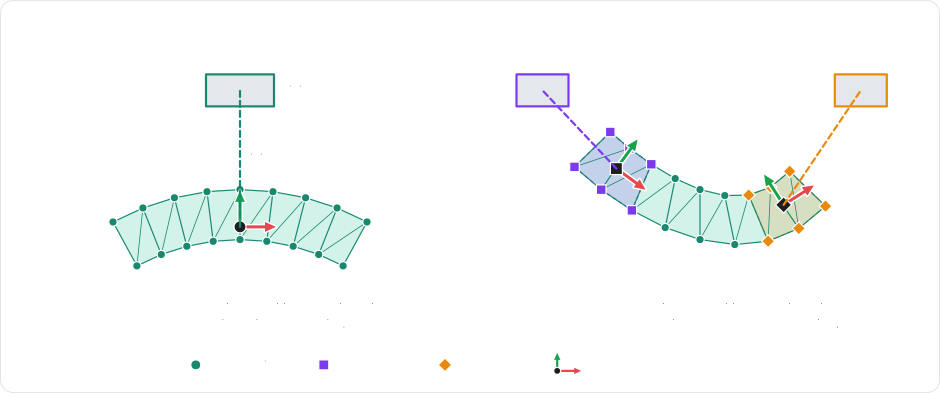
A single frame for the whole body is often not expressive enough: several joints attached to the root body all act on
the body as a whole, and their effect isn't concentrated where they are attached. This is why a soft-body can also be
given clusters (PhysicsWorld.add_soft_body_cluster), i.e.,
soft frames over any subset of its particles, each with its own pose computed by shape-matching over that subset only.
Joints attached to different clusters then act on different parts of the body, each with its own orientation:
Similarly, rigid colliders attached to the proxies of different clusters move and rotate independently, which is what allows the definition of rigid parts on a deformable body: the handle of a deformable hammer, the bones of a soft character, or the plate a jelly is carried on.
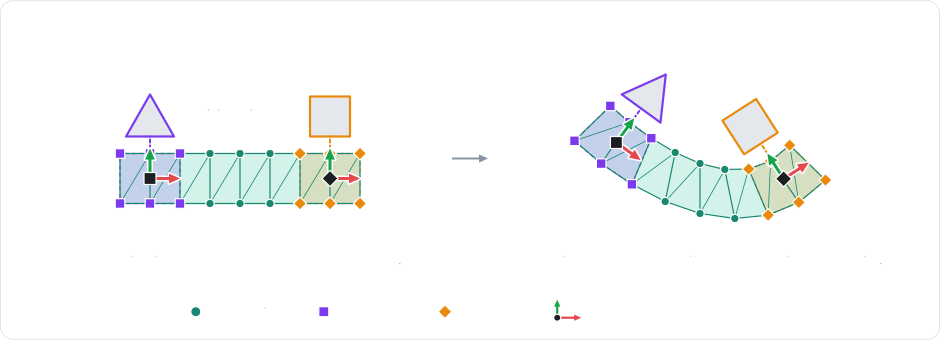
A cluster is identified by its index in the soft-body, returned by add_soft_body_cluster (which returns None if
none of the given particles is valid), and its proxy is given by SoftBody.cluster_proxy. Snapshots of the live
clusters of a body (their index, particles, and proxy) are given by the clusters property of SoftBody, and the
cluster a proxy stands for by the soft_body and soft_cluster properties of its RigidBody:
# A cluster over the top particles of the jelly: a rigid proxy that joints and
# colliders can attach to.
positions = world.soft_bodies[jelly_handle].particle_positions
top = np.flatnonzero(positions[:, 1] > 1.3)
cluster = world.add_soft_body_cluster(jelly_handle, top)
assert cluster is not None, "at least one valid particle"
proxy = world.soft_bodies[jelly_handle].cluster_proxy(cluster)
# A rigid plate welded onto the cluster.
plate = world.add_body(
    rp.RigidBody.dynamic(translation=(3.0, 1.9, 0.0)),
    colliders=[rp.Collider.cuboid(0.7, 0.05, 0.7).density(0.4)],
)
world.impulse_joints.insert(
    plate, proxy, rp.FixedJointBuilder().local_anchor1((0.0, -0.1, 0.0))
)
# A cluster can be pinned, driven or tuned as a whole.
jelly = world.soft_bodies[jelly_handle]
jelly.set_cluster_stiffness_scale(cluster, 2.0)
jelly.enable_cluster_shape_matching(cluster, True)
A cluster also defines a few settings for the elements it covers, which gives regional materials without needing separate bodies:
- The stiffness scale
(
set_cluster_stiffness_scale) multiplies the Young modulus of every cell entirely contained in the cluster (the cells straddling its boundary are left unchanged). - The edge softness
(
set_cluster_edge_softness) overrides the softness of every edge entirely contained in the cluster, e.g., a stiffer collar on a shirt. - The tear resistance
(
set_cluster_tear_resistance) multiplies the tear thresholds of every element entirely contained in the cluster, e.g., a tough region, or a perforation line. - Shape-matching (
enable_cluster_shape_matching) pulls the particles of the cluster toward the frame of its proxy (or toward the target pose given byset_cluster_shape_matching_target), so that part of the body tends to keep the shape it was created with.
The rotation of a cluster is deduced from its particles, which isn't possible for a cluster made of a single particle (or, in 3D, of collinear particles). Such a cluster has no angular response, therefore the angular parts of the joints attached to its proxy are disabled.
Attaching a rigid-body to a particle
A particle can also be attached directly to a rigid-body (SoftBody.attach_particle), which is
the simplest way of combining the two kinds of bodies: a rope tied to a swinging ball, a flag attached to its pole,
etc. Unlike pinning, an attachment is a two-way point-to-point constraint: the rigid-body holds the particle, and the
particle pulls the rigid-body back. The anchor is the position the particle has when the attachment is created,
expressed in the local frame of the rigid-body. Note that a particle attached twice keeps both of its attachments, and
that an attachment is undone with
SoftBody.detach_particle:
# Attach the last particle of a rope to a rigid ball, at the particle's position.
rope = rp.SoftBody.rope((-0.5, 5.0, 3.0), (2.5, 5.0, 3.0), 30).pinned_particles([0]).softness((40.0, 1.0))
rope_handle = world.add_soft_body(rope)
last_position = world.soft_bodies[rope_handle].particle_position(29)
ball = world.add_body(
    rp.RigidBody.dynamic(translation=last_position - (0.0, 0.3, 0.0)),
    colliders=[rp.Collider.ball(0.25).density(2.0)],
)
world.soft_bodies[rope_handle].attach_particle(29, ball, world.rigid_bodies)
Note that the rigid-body set of the world is given to SoftBody.attach_particle, so that the anchor can be expressed in
the local frame of the rigid-body. The attachments of a soft-body are listed by its particle_attachments property,
each SoftParticleAttachment giving its particle, its rigid-body (body), its local_anchor, and the impulse it
applied during the last step.
Particles and kinematic control
The state of a soft-body is the state of its particles, which are identified by their index in the body. Their positions
and their velocities can be read (particle_position, particle_positions, particle_velocity, particle_velocities) and modified (set_particle_position, set_particle_velocity) at any time, one by one or all at
once. The elements built from them (edges, cells, and boundary) can be read as well, e.g., in order to render the body with your own mesh. The arrays of every particle and of every element are NumPy arrays with one row per particle or per element, e.g., of shape (N, 3) for the positions and (B, 3) for the boundary triangles. All the positions (or velocities) are modified at once by assigning such an array to particle_positions (or particle_velocities). A snapshot of all the properties of a particle (its mass, its rest position, whether it is pinned, etc.) is given by particle.
A particle can also be pinned (set_particle_pinned). A pinned particle is kinematic: it is no longer affected by the forces
nor by the contacts, and it will simply hold its position, or follow the kinematic target
(set_particle_kinematic_target) or the velocity it is given. This is, e.g., how a piece of cloth
is hung on a wall, or how a rope is dragged by the player. Releasing the particle gives it back its nominal mass and
lets it keep its current velocity:
soft_body = world.soft_bodies[cloth_handle]
# Read the particles.
position = soft_body.particle_position(0)
velocity = soft_body.particle_velocity(0)
# All the positions (or velocities) at once, as an (N, 3) NumPy array.
positions = soft_body.particle_positions
assert positions.shape == (soft_body.num_particles, 3)
# Move a particle.
soft_body.set_particle_position(1, position + rp.Vec3(0.0, 0.1, 0.0))
soft_body.set_particle_velocity(1, velocity)
# Pin (or release) a particle; a pinned particle can be driven like a kinematic body.
soft_body.set_particle_pinned(2, True)
soft_body.set_particle_kinematic_target(2, (-1.0, 2.5, -0.8))
# The elements, as NumPy arrays of particle indices: edges, cells and the boundary triangles.
edges = soft_body.edges  # Shape (E, 2).
cells = soft_body.cells  # Shape (C, 4).
boundary = soft_body.boundary  # Shape (B, 3).
assert len(edges) > 0 and len(cells) == 0 and len(boundary) > 0
Setting the position of a particle explicitly teleports it: no contact is taken into account along the way, so a particle can be moved inside of another object this way. Whenever the motion must be seen by the contacts and by the friction (to drag a piece of cloth, for example), it is recommended to pin the particle and to give it a kinematic target instead.
Controlling a region kinematically
A whole region of the body is controlled at once through a cluster covering it. Pinning
the cluster (set_cluster_pinned) pins all of its particles, and its kinematic target
(set_cluster_kinematic_target) moves them
rigidly: each pinned particle is sent where the rest shape of the cluster places it at the target pose, with the
matching velocity. The rest of the body is then simulated as usual, and drags behind the controlled region, e.g., the
hand of a soft character carrying something:
# Pin every particle of the cluster, then move it along a path: the cluster behaves like a
# kinematic rigid part dragging the rest of the body.
jelly = world.soft_bodies[jelly_handle]
jelly.set_cluster_pinned(cluster, True)
jelly.set_cluster_kinematic_target(cluster, rp.Isometry3(translation=(3.0, 2.0, 0.0)))
# Release it: the cluster is simulated again.
jelly.set_cluster_pinned(cluster, False)
Deformable colliders and skinning
Games don't need the simulated shape of a body to be as detailed as its visual shape: a coarse and well-shaped lattice is faster and more stable to simulate than one cell per visual triangle. This is why Rapier supports cage simulation and skinning. The detailed mesh is embedded in a coarse volumetric lattice, aka. its cage, which is the only part being simulated. The vertices of the mesh are then interpolated from the deformed cells holding them, aka. skinning:
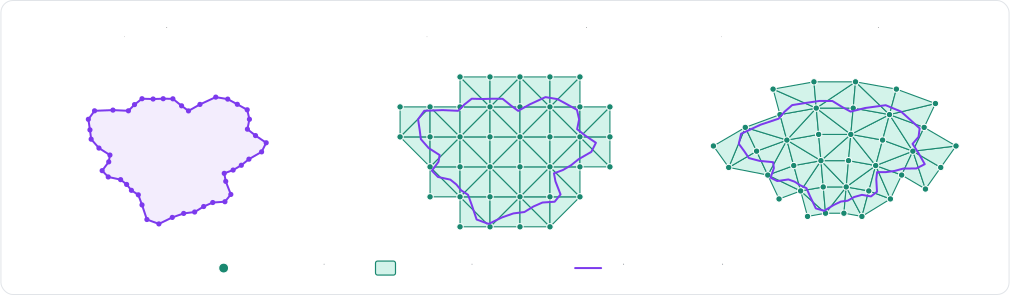
Skinned soft-bodies
The
SoftBody.volumetric
constructor computes the cage of a closed mesh automatically when its skinned argument is True, and keeps the
mesh as the skin of the body. That automatic cage is built for performance rather than geometric fidelity: in 3D, it
encloses the whole mesh with the tetrahedra of a lattice, without snapping them to the mesh:
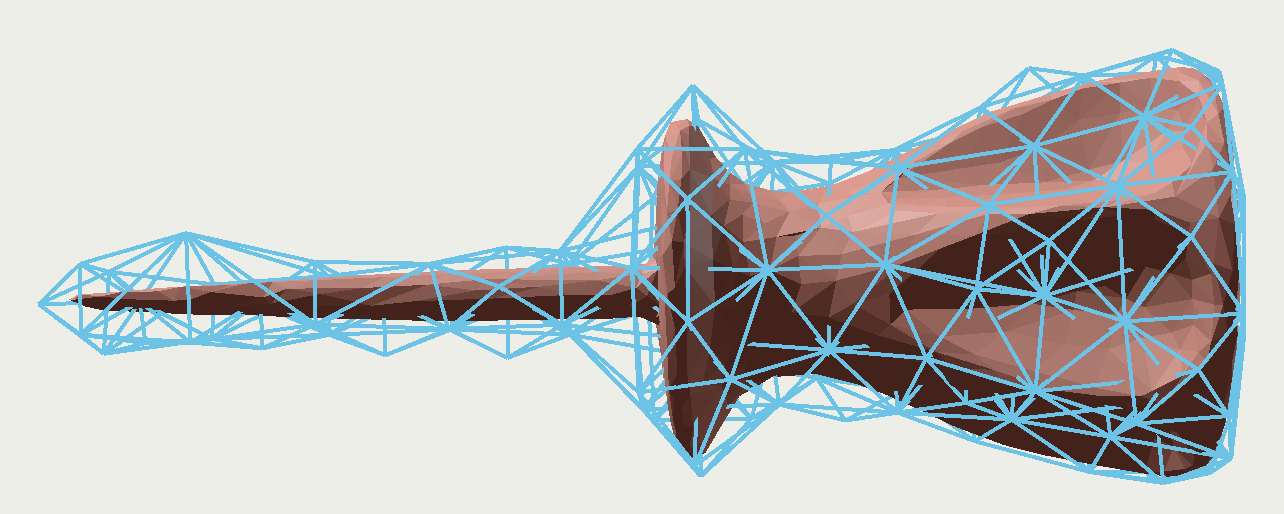
By default, the body still collides through the boundary of its cage, which is as coarse as its cells. Its skin can
become its actual collision mesh instead with
SoftBodyBuilder.skin_collision.
SoftBody.volumetric raises a MeshConversionError if the mesh can't be filled with cells, e.g., because it isn't
closed. The vertices of the skin, as well as the ones of any other mesh of the body, are read back from a
SoftCollisionMesh: a snapshot of the mesh taken when it is requested, which vertices (in world-space) and indices
are NumPy arrays. SoftBody.collision_mesh gives the collision mesh of the body (its skin here), and
SoftBody.mesh_of gives the mesh of a collider. A skin that doesn't collide has no collider: SoftBody.meshes lists
every mesh of the body (its is_skinned and collision_enabled properties telling which mesh is which), and
SoftBody.mesh gives the mesh with the given identifier (a SoftMeshId):
# A detailed mesh held by a coarse cage of cells: only the cells are simulated, and the mesh
# (the skin) follows their deformation.
vertices, indices = rp.Ball(0.5).to_trimesh(24, 24)
# Raises `MeshConversionError` if the mesh isn't closed or doesn't enclose any volume.
skinned = (
    rp.SoftBody.volumetric(vertices, indices, 0.25, skinned=True)
    # Collide through the skin instead of the boundary of the cage.
    .skin_collision(True)
    .translated((0.0, 4.0, 3.0))
)
skinned_handle = world.add_soft_body(skinned)
# The skin is the body's collision mesh: read its vertices back to render it.
skin = world.soft_bodies[skinned_handle].collision_mesh()
assert skin is not None and skin.is_skinned
assert skin.vertices.shape == vertices.shape
A skin doesn't need a computed cage: any mesh can be given as the skin of a body built with cells, with
SoftBodyBuilder.skin. Each of its
vertices is bound to the cell closest to it, in the pose the cells are built in.
Deformable colliders
The colliders built from the surface or the skin of a soft-body are generated by the engine itself, but it is also
possible to give a body a collider of your own which vertices follow its particles: a deformable collider
(PhysicsWorld.insert_deformable). This is a polyline in
2D, or a triangle mesh in 3D, flagged as deformable, and attached to the proxy of one of the
clusters of the body (the root body, a cluster itself, can be used too). Its vertices are
given in the frame of that proxy, and they can be read back at any time in order to render the mesh where the simulation moved
it. A deformable collider can be a sensor as well, e.g., to detect what enters a deformable volume.
How the vertices follow the particles is given by the binding
(SoftMeshBinding):
skinned: each vertex is embedded in the cell of the cluster holding it, i.e., the collider is a skin of the cage.direct: the vertexifollows the particle given for it, which must belong to the cluster. Its alternative that binds every vertex to the closest particle within a given distance (direct_by_position) is useful when the mesh is the one the particles were built from.
The collider is built by Collider.trimesh with the TriMeshFlags.DEFORMABLE flag, and its binding by one of the
static methods of SoftMeshBinding: skinned(), direct(particles), or direct_by_position(eps), the
self_contacts method of the binding making the mesh collide with itself. The collider is created by
PhysicsWorld.insert_deformable (or by ColliderSet.insert_deformable when the sets are used directly), given the
rigid-body handle of the root body (SoftBody.root_body) or of a cluster proxy (SoftBody.cluster_proxy) it is
attached to. Its other properties (friction, collision groups, events, sensor, etc.) apply as usual. If the binding
fails, a SoftBindingError is raised. Then the current vertices of the collider are read from its SoftCollisionMesh
(SoftBody.mesh_of), and the collider tells which soft-body mesh it is with its deformable_mesh_ref property:
# A deformable triangle mesh bound to the jelly: each vertex is embedded in the cell
# holding it (`skinned`), or follows one particle (`direct`). The mesh is given in the
# frame of the proxy it is attached to.
jelly = world.soft_bodies[jelly_handle]
root = jelly.root_body
to_root = world.rigid_bodies[root].position.inverse()
center = jelly.center_of_mass
r = 1.0
offsets = [(r, 0.0, 0.0), (-r, 0.0, 0.0), (0.0, r, 0.0), (0.0, -r, 0.0), (0.0, 0.0, r), (0.0, 0.0, -r)]
vertices = np.array([tuple(to_root.transform_point(center + v)) for v in offsets], dtype=np.float32)
indices = np.array(
    [[0, 2, 4], [2, 1, 4], [1, 3, 4], [3, 0, 4], [2, 0, 5], [1, 2, 5], [3, 1, 5], [0, 3, 5]],
    dtype=np.uint32,
)
skin = rp.Collider.trimesh(vertices, indices, rp.TriMeshFlags.DEFORMABLE).sensor(True)
# Raises `SoftBindingError` if the mesh can't be bound to the cluster of `root`.
skin_handle = world.insert_deformable(skin, rp.SoftMeshBinding.skinned(), root)
# The mesh follows the particles: read its current vertices back (a NumPy array).
mesh = world.soft_bodies[jelly_handle].mesh_of(skin_handle)
skin_vertices = mesh.vertices
assert skin_vertices.shape == (6, 3)
A deformable collider has no mass: its density is ignored, and it is the particles which hold the mass of the soft-body. Note that a collider given no contact skin explicitly gets the particle radius of the soft-body as its skin, so its thickness matches the thickness of the surface of the body.
Plasticity and tearing
A soft-body can deform permanently in two ways:
- Plasticity changes the rest shape of the body, without any change of its topology: a metal sheet folding on impact, a piece of clay being modeled, the chassis of a car denting.
- Tearing changes its topology: pieces of the body physically disconnect from each other, e.g., a piece of fabric torn in two, or a jelly sliced by a blade.
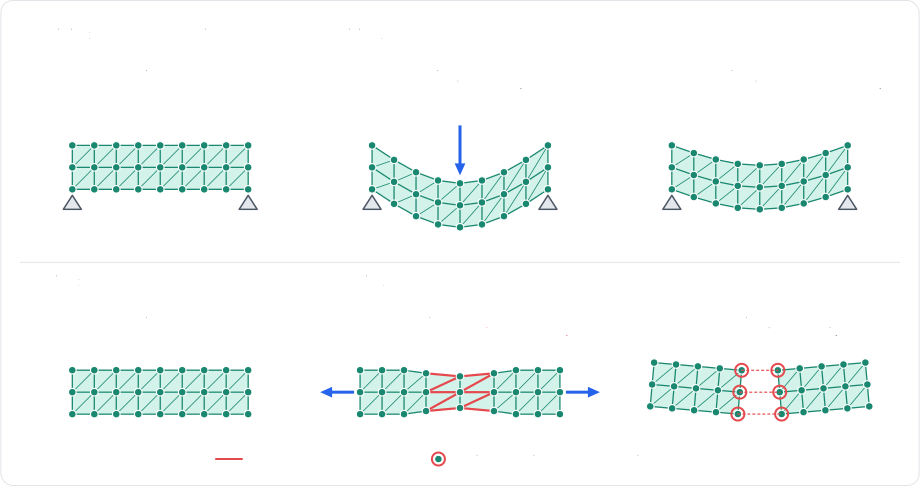
Both are supported by the constraints solver and by the FEM solver. Note that with the constraints solver, the quality of the plastic deformations follows the convergence of the solver: more iterations result in more convincing permanent deformations.
Plasticity
Plasticity is configured by the material of the body, separately for its cells and for its edges:
- A cell strained past its plastic yield
(
plastic_yield) absorbs the strain in excess into its rest shape, at the rate of its plastic creep (plastic_creep, per second), up to a total permanent deformation of its plastic max (plastic_max). This flow preserves the volume of the cell, and an inverted cell never flows. Note that this only applies to the elastic cells (theSoftBodyCellModel.COROTATIONALandSoftBodyCellModel.NEO_HOOKEANmodels): theSoftBodyCellModel.VOLUMEcells never flow. - An edge strained past its edge plastic yield
(
edge_plastic_yieldcompared to|length / rest_length - 1|) sees its rest length flow toward its current length at the rate of its edge plastic creep (edge_plastic_creep), up to a total permanent set of its edge plastic max (edge_plastic_max, as a fraction of its initial length). Its edge plastic flow (edge_plastic_flow, aSoftEdgePlasticFlow) selects whether that happens when it is squeezed, when it is stretched, or both.
A plastic deformation can be undone at any time
(SoftBody.reset_plasticity),
the particles springing back elastically from there. Note that the tear thresholds of the edges are always measured on
their initial length, not on their plastic one:
The material property of a soft-body is a live view of its material (a SoftBodyMaterial): setting one of its fields
changes the body directly. Assigning a whole SoftBodyMaterial to it replaces the material, and its copy method
gives a detached copy:
# The jelly has elastic (corotational) cells: the plasticity of `VOLUME` cells has no effect.
jelly = world.soft_bodies[jelly_handle]
# A live view of the material: setting one of its fields changes the body.
material = jelly.material
# Cells: the rest shape flows toward the current one past 5% strain, at a rate of 20 per
# second, up to a total permanent deformation of 50%.
material.plastic_yield = 0.05
material.plastic_creep = 20.0
material.plastic_max = 0.5
# Edges: the rest length flows past 10% strain, up to half the initial length, but only
# when squeezed (a dent stays, a stretch springs back).
material.edge_plastic_yield = 0.1
material.edge_plastic_creep = 10.0
material.edge_plastic_max = 0.5
material.edge_plastic_flow = rp.SoftEdgePlasticFlow.COMPRESSION
# Every permanent deformation can be undone at once.
jelly.reset_plasticity()
Tearing
Tearing is configured by the material of the body as well. An element tears at the end of the timestep during which its load goes beyond one of the two thresholds of the material:
- The tear strain (
tear_strain) applies to the edges (a fraction of their initial rest length) and to the elastic cells (their largest tensile strain). Note that volume cells never tear. - The tear force (
tear_force) applies to the edges only: an edge tears if its force along its direction exceeds it.
The other settings of the material shape how a tear propagates:
- The tear smoothing (
tear_smoothing) is the time constant (in seconds) over which the load of an element is smoothed before being tested, so that a single impact spike doesn't tear. - The interior strength (
interior_strength) makes the undamaged interior elements (without any particle on the surface or on an earlier tear) that many times tougher, so that tears start from the surface or from an existing damage, and run inward. - The max tears per step (
max_tears_per_step) bounds how many edges may tear during one step, the most loaded going first, which paces the cracks of a taut sheet (an edge loaded past twice its threshold always tears). - The min piece (
min_piece) is the smallest piece (in elements) a tear may split off, any tear leaving a smaller piece waiting until it doesn't.
Individual edges can be made tougher (or weaker, e.g., a perforation line) with their tear resistance, given to the
builder
(SoftBodyBuilder.edge_tear_resistance)
or by cluster:
The optional thresholds of the material (tear_strain, tear_force, and min_piece) are disabled when they are set
to None. As for the plasticity, they are set through the live view of the material of the soft-body:
material = world.soft_bodies[cloth_handle].material
# An edge tears past 40% of stretch, or past a force of 50 along its direction (`None`
# disables a threshold).
material.tear_strain = 0.4
material.tear_force = 50.0
# The load is smoothed over 0.1 second, so a single impact spike doesn't tear.
material.tear_smoothing = 0.1
# Undamaged interior elements are twice as tough: tears start from the surface.
material.interior_strength = 2.0
# A tear never splits off a piece smaller than 10 elements.
material.min_piece = 10
The tear resistance of the edges is given to the builder as a list of (edge index, resistance) pairs. It can also be
changed after the insertion, for the edges and the cells with SoftBody.set_edge_tear_resistance and
SoftBody.set_cell_tear_resistance, and for the clusters with SoftBody.set_cluster_tear_resistance:
# A perforation line: these edges tear at half the load of the others (1.0 restores the
# threshold of the material).
perforated = rp.SoftBody.rope((0.0, 6.0, -3.0), (3.0, 6.0, -3.0), 30).edge_tear_resistance(
    [(14, 0.5), (15, 0.5)]
)
perforated_handle = world.add_soft_body(perforated)
# The same, after the insertion.
cloth = world.soft_bodies[cloth_handle]
for edge in (30, 31, 32):
    cloth.set_edge_tear_resistance(edge, 0.5)
# Every element of the root cluster of the jelly (i.e., of the whole body) is twice as
# tough, and its first cell three times as tough.
jelly = world.soft_bodies[jelly_handle]
jelly.set_cluster_tear_resistance(0, 2.0)
jelly.set_cell_tear_resistance(0, 3.0)
A tear can also be requested explicitly, either edge by edge
(SoftBody.tear_edge, tear_cell),
or all at once along a set of edges and through a set of cells
(PhysicsWorld.tear_soft_body).
Finally, a body can be cut
(PhysicsWorld.cut_soft_body)
along a blade, i.e., a segment in 2D or a triangle in 3D, which is the most convenient way of slicing a body with the
weapon of a player. Note that the cuts ignore the min piece threshold.
Tearing and cutting lose no material: the particles are duplicated along the tear instead of being removed, so the area (2D) or the volume (3D) of the body is preserved. The pieces a tear disconnects become soft-bodies of their own, which keep the material and the settings of the body they come from, the deformable meshes and the joints following the pieces they were attached to. Therefore the particles of the torn body are renumbered, and the returned event tells where each of them went:
PhysicsWorld.tear_soft_body and PhysicsWorld.cut_soft_body (or SoftBodySet.tear and SoftBodySet.cut when the
sets are used directly) return a SoftBodyTearEvent, or None if the tear or the cut changed nothing:
soft_bodyis the torn soft-body, andbodies()the soft-bodies it is now made of: the torn body alone if nothing was split off, or its pieces otherwise. Thepiecesproperty lists these pieces (empty if nothing was split off), the piece keeping the handle of the torn body first, eachSoftBodyPiecegiving itssoft_bodyand itsparticles(i.e., their indices in the torn body).particle_destination(i)tells in which soft-body a particle of the torn body is now, and what its index is there, as a(handle, index)tuple (orNoneif the particle has no destination).torn_edges,torn_cells, andremoved_edgesgive the particles of the elements involved in the change of topology as NumPy arrays.split_particlesgives the particles the tear duplicated, as(copy, source)pairs, andinserted_particlesthe particles it inserted.clustersandmoved_jointsgive the clusters the tear split, and the joints it moved from a cluster proxy to another.
A soft-body split off by a tear remembers the body it comes from (SoftBody.origin), and the torn body lists the ones
split off it (SoftBody.pieces). Finally, SoftBody.topology_version changes whenever the connectivity of the
particles of a body changes, which is a convenient way of knowing when the render meshes must be rebuilt:
# Elements tear on their own past the material's thresholds; a tear can also be requested.
world.soft_bodies[cloth_handle].tear_edge(10)  # Applied at the end of the next step.
# Tear at once along edges and through cells; pieces the tear disconnects become soft
# bodies of their own.
event = world.tear_soft_body(cloth_handle, [11, 12], [])
if event is not None:
    print(f"{len(event.torn_edges)} edges torn")
# Cut along a blade (a triangle), without removing material.
blade = ((-0.1, -10.0, -10.0), (-0.1, 10.0, 0.0), (-0.1, -10.0, 10.0))
event = world.cut_soft_body(cloth_handle, blade)
if event is not None:
    for piece in event.pieces:
        print(f"piece {piece.soft_body} has {len(piece.particles)} particles")
    # Where a particle of the torn body went.
    destination = event.particle_destination(n * n - 1)
    if destination is not None:
        body, index = destination
        print(f"particle {n * n - 1} is now particle {index} of {body}")
# The connectivity of the cloth changed: its render mesh must be rebuilt.
assert world.soft_bodies[cloth_handle].topology_version > 0
Tearing one edge with
SoftBody.tear_edge
only marks it: the tear is applied at the end of the next step, together with the tears the simulation generates itself.
The methods of the
PhysicsWorld
tear and cut immediately, which is why they are the ones giving back an event.
Volume cells never tear. Therefore a body which cells use the SoftBodyCellModel.VOLUME model
will only tear along its edges, and a material with a tear strain should be combined with the
SoftBodyCellModel.COROTATIONAL or the SoftBodyCellModel.NEO_HOOKEAN
cell model if you expect it to be torn apart.
Tear events
The tears applied during a step, whether they were generated by the simulation itself or requested with
SoftBody.tear_edge,
are reported the same way as the
collision events: by the event handler of the world (PhysicsWorld.event_handler).
Each event (a SoftBodyTearEvent) identifies the soft-body that tore and gives the
pieces it was split into, so the rendering of the scene can be updated accordingly:
A ChannelEventCollector keeps the tear events of every step until they are drained with its
drain_soft_body_tear_events method. Any other object following the EventHandler protocol can be used as the event
handler as well (the methods it doesn't need can be omitted): its handle_soft_body_tear_event(soft_bodies, event)
method is called at the end of the step for every soft-body that tore, soft_bodies being the SoftBodySet of the
world. The soft-bodies can be read during that call, but not modified. This is the same SoftBodyTearEvent as the one
returned by
PhysicsWorld.tear_soft_body and PhysicsWorld.cut_soft_body, so everything described in the
previous section applies to it as well:
# Tears applied during a step are reported to the event handler of the world.
collector = rp.ChannelEventCollector()
world.event_handler = collector
world.step()
for tear_event in collector.drain_soft_body_tear_events():
    print(f"Soft body {tear_event.soft_body} tore")
Forces and impulses
Forces and impulses can be applied to a soft-body as a whole
(add_force, apply_impulse),
or to one particular particle
(add_particle_force, apply_particle_impulse).
A force added to the whole body is added to each of its free particles and is persistent, i.e., it keeps being applied
at each step until the forces are reset (reset_forces), exactly like the forces of
a rigid-body. An impulse applied to the whole body is a velocity change
applied to each of its free particles, so the body is kicked as a whole without being deformed. Note that the pinned
particles ignore both.
Two additional methods are provided for the effects which magnitude depends on the distance to a point: an impulse
applied within a radius
(apply_impulse_at_point), and a
radial blast pushing the particles away from its center
(apply_radial_impulse). In both
cases the impulse is scaled linearly down to zero at the given radius. Like for the rigid-bodies,
the wake_up argument (True by default) of all these methods ensures the soft-body is
awake before the force or the impulse is applied:
soft_body = world.soft_bodies[cloth_handle]
# The soft-body is woken up, unless `wake_up=False` is given.
soft_body.reset_forces()  # Reset the forces to zero.
soft_body.add_force((0.0, 1.0, 0.0))  # Spread over the particles by mass.
soft_body.add_particle_force(3, (0.0, 1.0, 0.0))
soft_body.apply_impulse((0.0, 0.1, 0.0))
soft_body.apply_particle_impulse(3, (0.0, 0.1, 0.0))
# An impulse on the particles within 0.5 of a point, scaled down with the distance.
soft_body.apply_impulse_at_point((0.0, 0.1, 0.0), (0.0, 2.0, 0.0), 0.5)
# A blast pushing the particles away from a center.
soft_body.apply_radial_impulse((0.0, 2.0, 0.0), 0.1, 1.0)
Global settings
A few settings are shared by every soft-body of the world. They are part of the integration
parameters (the soft_bodies property of IntegrationParameters, a SoftBodiesSettings), so they can
be changed between two steps:
- The re-sweep strain
(
resweep_strain) is the strain beyond which a constraint is solved once more after the contacts of every substep. This is what keeps a light body buried under heavier ones from being torn apart by them. - The maximum number of extra substeps
(
max_extra_substeps) is the number of substeps a soft-body is allowed to ask for while it is hit fast. Those substeps bound the motion of its particles, and the motion of the rigid-bodies approaching them, by about one particle radius per substep. Giving zero disables them. - The contact stiffening
(
contact_stiffening) multiplies the natural frequencies of the contacts involving a soft-body. Those contacts run stiffer than the rigid ones because the mass behind one contact is the mass of a few particles, and not the mass of the whole body.
In addition, the detection of the penetrations and of the tangles, as well as the way the bodies recover from them, are
configured by the recovery settings (recovery, a SoftRecoverySettings), where every mechanism can be switched
off individually (see the contacts section for the ones to look at
first). The tuning of the linear solves of the FEM solver lives there as well (fem, a SoftFemParameters):
The soft_bodies property of the integration parameters of the world is a live view of the settings, and so are its
recovery and fem properties: setting one of their fields changes the world directly. Assigning a whole
SoftBodiesSettings replaces them all, and their copy method gives a detached copy, e.g., to keep them aside before
an experiment:
# Settings shared by every soft body of the world (a live view of the integration parameters).
settings = world.integration_parameters.soft_bodies
# Strain beyond which a constraint is re-solved after the contacts of every substep.
# Default: 0.75
settings.resweep_strain = 0.75
# Extra substeps a soft body requests while it is hit fast; 0 disables them.
# Default: 4
settings.max_extra_substeps = 4
# Stiffening of the soft-body contacts relative to the rigid ones.
# Default: 4.0
settings.contact_stiffening = 4.0
# The tangle detection and recovery stack can be switched off mechanism by mechanism.
settings.recovery.crossing_repulsion = True
Removal
Removing a soft-body (PhysicsWorld.remove_soft_body) removes everything the engine created for it: its root
body, the proxies of its clusters, the colliders of its surface and of its deformable meshes, as well as the joints
attached to any of them. One cluster can also be removed on its own
(PhysicsWorld.remove_soft_body_cluster):
# Removing a soft body removes its root body, its proxies, its colliders and the joints
# attached to them.
world.remove_soft_body(rope_handle)
# A cluster can be removed on its own.
world.remove_soft_body_cluster(jelly_handle, cluster)
Removing a cluster also removes the particles that only this cluster covered, with their elements and their
attachments. Therefore removing the last cluster of a soft-body removes the soft-body itself. Note that removing the
proxy of a cluster from the rigid-body set (with PhysicsWorld.remove_body, or with RigidBodySet.remove given the soft-body set as its soft_bodies argument, without which it raises a ValueError) is equivalent to removing the cluster.