Scene queries
Scene queries are geometric queries that take all the colliders of the physics world into account. These queries are available through the QueryPipeline of the physics world.
The QueryPipeline is given by the PhysicsWorld.query_pipeline property, which returns the same object every time.
It reuses the acceleration data-structure (BVH) of the broad-phase, which is automatically updated by
PhysicsWorld.step. Therefore the scene queries take into account the positions of the colliders at the end of the
last timestep: a collider inserted or moved since then (e.g. by setting its translation) may not be found at its new
position before the next step (a removed collider is never returned though):
# Game loop.
for _ in range(10):
    # Stepping the simulation updates the broad-phase the scene queries rely on.
    world.step()

    # The scene queries take into account the positions of the colliders at the end of
    # the last timestep.
    query_pipeline = world.query_pipeline
    # Run the scene queries with `query_pipeline` here.
If the scene queries must see the colliders inserted, moved, or re-shaped since the last step without waiting for the
next one, PhysicsWorld.update_query_pipeline refreshes the BVH of the broad-phase. This doesn't interfere with the
next step (which still processes these changes), but it recomputes the AABB of every enabled collider, so it shouldn't
be called when the queries are run right after a step.
Every scene query takes an optional filter argument, a QueryFilter which selects the colliders taken into account
(see the query filters section). The queries involving a shape (e.g.
QueryPipeline.intersect_shape or QueryPipeline.cast_shape) take a SharedShape, created by one of its
constructors (e.g. SharedShape.cuboid) or given by the shape property of an existing collider. Finally, the
queries finding several colliders don't return a list: they call a function given as argument once per collider
found, and stop the search as soon as this function returns False.
Ray-casting
Ray-casting is a geometric query that finds one or several colliders intersecting a half-line. Ray-casting is an extremely common operation that covers a wide variety of use-cases: firing bullets, character controllers, rendering (for ray-tracing), etc.
A ray is defined by its origin and its direction: it can be interpreted as a single point moving in a straight line towards the ray direction.
In addition to the ray geometric information, ray-casting method allow additional control over the behavior of the ray cast like limiting the length of the ray and ignoring some colliders. See the detailed ray-cast arguments description after the next example.
There are multiple ray-casting methods yielding more or less detailed results (see example below). The more results you get, the more computationally expensive the ray-cast will be.
ray = rp.Ray(origin=(1.0, 2.0, 3.0), dir=(0.0, 1.0, 0.0))
max_toi = 4.0
solid = True
query_filter = rp.QueryFilter()

query_pipeline = world.query_pipeline

hit = query_pipeline.cast_ray(ray, max_toi, solid, filter=query_filter)
if hit is not None:
    handle, toi = hit
    # The first collider hit has the handle `handle` and it hit after
    # the ray travelled a distance equal to `ray.dir * toi`.
    hit_point = ray.point_at(toi)  # Same as: `ray.origin + ray.dir * toi`
    print(f"Collider {handle} hit at point {hit_point}")

hit = query_pipeline.cast_ray_and_get_normal(ray, max_toi, solid, filter=query_filter)
if hit is not None:
    handle, intersection = hit
    # This is similar to `QueryPipeline.cast_ray` illustrated above except
    # that it also returns the normal of the collider shape at the hit point.
    hit_point = ray.point_at(intersection.time_of_impact)
    hit_normal = intersection.normal
    print(f"Collider {handle} hit at point {hit_point} with normal {hit_normal}")


def on_ray_hit(handle, intersection):
    # Callback called on each collider hit by the ray.
    hit_point = ray.point_at(intersection.time_of_impact)
    hit_normal = intersection.normal
    print(f"Collider {handle} hit at point {hit_point} with normal {hit_normal}")
    return True  # Return `False` to stop the search.


query_pipeline.intersect_ray(ray, max_toi, solid, on_ray_hit, filter=query_filter)
QueryPipeline.cast_ray only gives the handle of the first collider hit and the time-of-impact, whereas
QueryPipeline.cast_ray_and_get_normal also gives a RayIntersection with the world-space normal of the collider's
shape at the hit point, as well as the feature of the shape that was hit (a vertex, an edge, or a face, identified by
a FeatureId). Both return None if the ray doesn't hit anything. Finally, QueryPipeline.intersect_ray calls the
given function with the handle and the RayIntersection of every collider intersected by the ray (in no particular
order), until this function returns False.
Aside from the ray being cast, all these ray-casting methods take a few extra parameters for controlling the behavior of the ray-cast:
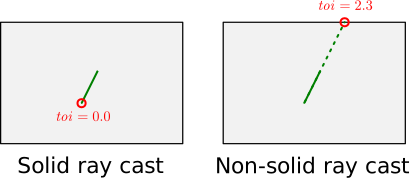
max_toi: is the maximum "time-of-impact" that can be reported by the ray-cast. The notion of "time-of-impact" refer to the fact that a ray can be seen as a point starting atray.originmoving at a linear velocity equal toray.dir. Therefore,max_toilimits the ray-cast to the segment:[ray.origin, ray.origin + ray.dir * max_toi].solid: this argument controls the behavior of the ray-cast ifray.originis inside of a shape: ifsolidisTruethen the hit point will be the ray origin itself (toi = 0.0) because the interior of the shape will be assumed to be filled with material. IfsolidisFalsethen the shape will be assumed to have an empty interior and the hit point will be the first time the ray hits the shape's boundary. The following 2D example illustrates the difference between the two scenarios. The ray is in green and the resulting hit point circled in red:
In addition, it is possible to only apply the scene query to a subsets of the colliders using a query filter.
Shape-casting
Shape-casting (aka. sweep tests) is the big brother of ray-casting. The only difference with ray-cast is that instead of being a point travelling along a straight line, we have a complete shape travelling along a straight line. This is typically used for character controllers in games to determine by how much the player can move before it hits the environment.
Just like ray-casting, it is possible to control the behavior of the shape-casting like limiting the distance
travelled by the shape cast, and ignoring some colliders. See the details about the
max_toi and filter arguments in the ray-casting section.
The shape-casting along a straight line is performed by QueryPipeline.cast_shape.
This method has similar arguments as QueryPipeline.cast_ray except
that the ray is replaced by three arguments: the shape being cast, the initial position of the shape (this is analog to ray.origin) and
the linear velocity the shape is travelling at (this is analog to ray.dir), and the max_toi is replaced by a ShapeCastOptions:
shape = rp.SharedShape.cuboid(1.0, 2.0, 3.0)
shape_pos = rp.Isometry3(translation=(0.0, 1.0, 0.0), rotation=rp.rotation_from_angle((0.2, 0.7, 0.1)))
shape_vel = (0.1, 0.4, 0.2)
query_filter = rp.QueryFilter()
options = rp.ShapeCastOptions(
    max_time_of_impact=4.0,
    target_distance=0.0,
    stop_at_penetration=False,
    compute_impact_geometry_on_penetration=False,
)

query_pipeline = world.query_pipeline

hit = query_pipeline.cast_shape(shape_pos, shape_vel, shape, options, filter=query_filter)
if hit is not None:
    handle, hit = hit
    # The first collider hit has the handle `handle`. The `hit` is a
    # structure containing details about the hit configuration.
    print(f"Hit the collider {handle} with the configuration: {hit}")
The cast shape is a SharedShape, and its initial position is an Isometry3. The ShapeCastOptions, whose
constructor takes each of its properties as a keyword argument, control the behavior of the shape-casting:
max_time_of_impactplays the role of themax_toiof the ray-casts: the shape travels at mostshape_vel * max_time_of_impact. It is unbounded by default, andShapeCastOptions.with_max_time_of_impactgives the default options with a finitemax_time_of_impact.target_distancemakes the shape-casting report a hit as soon as the cast shape gets closer than this distance to a collider, instead of waiting for an actual contact.stop_at_penetrationcontrols the behavior of the shape-casting if the shape is already intersecting a collider at its initial position. If it isTrue(the default), that collider is reported with a time-of-impact equal to zero. If it isFalse, that penetration is ignored if the motion is separating the shapes, and the shape-casting searches for a later impact.compute_impact_geometry_on_penetrationis detailed below.
QueryPipeline.cast_shape returns None if the shape doesn't hit anything, and the handle of the collider hit
together with a ShapeCastHit otherwise.
The result of the shape-casting includes the handle of the first collider being hit, as well as detailed information about the geometry of the hit:
hit.time_of_impact: indicates the time of impact between the shape and the collider hit. This means that after travelling a distance ofshape_vel * hit.time_of_impactthe collider and the cast shape are exactly touching. Ifhit.time_of_impact == 0.0then the shape is already intersecting a collider at its initial position.hit.witness1: indicates the contact point on the collider hit when the cast shape and the collider are touching, expressed in world-space.hit.witness2: indicates the contact point on the cast shape when the cast shape and the collider are touching, expressed in the local-space of the cast shape.hit.normal1: indicates the outward normal of the collider hit at the contact pointhit.witness1, expressed in world-space.hit.normal2: indicates the outward normal of the cast shape at the contact pointhit.witness2, expressed in the local-space of the cast shape.
Because the cast shape moved, hit.witness2 and hit.normal2 can be converted to world-space by applying the pose of
the cast shape at the time of impact, i.e., its initial pose translated by shape_vel * hit.time_of_impact.
If the shape was already intersecting a collider at its initial position (hit.status is then
ShapeCastStatus.PENETRATING_OR_WITHIN_TARGET_DIST), the witness points and normals are only reliable if
ShapeCastOptions.compute_impact_geometry_on_penetration is True (which is its default value).
Nonlinear shape-casting
The shape-casting above only moves the shape along a straight line: its orientation doesn't change during the cast.
If the rotation of the shape matters, QueryPipeline.cast_shape_nonlinear performs a nonlinear shape-casting: the
shape follows a rigid motion combining a constant linear velocity and a constant angular velocity. This motion is
described by a NonlinearRigidMotion which contains the initial pose of the shape (start), its linear and angular
velocities (linvel and angvel), and the local-space point around which the shape rotates (local_center). At time
, the shape is rotated by the angular velocity times around that point, and translated by the linear velocity
times . The first impact is searched for between the start_time and end_time arguments. This is typically
useful to predict if a rotating object (e.g. a spinning blade, a swinging door, or the collider of a rigid-body with a
non-zero angular velocity) will hit something during a timestep:
# The shape rotates around its center (in its local-space) while it translates.
motion = rp.NonlinearRigidMotion(
    start=rp.Isometry3(translation=(5.0, 8.0, 0.0)),
    local_center=(0.0, 0.0, 0.0),
    linvel=(0.0, -4.0, 0.0),
    angvel=(0.0, 0.0, 3.0),
)
# Only `stop_at_penetration` is taken into account by the nonlinear shape-casting.
options = rp.ShapeCastOptions(stop_at_penetration=True)
start_time = 0.0
end_time = 2.0

hit = query_pipeline.cast_shape_nonlinear(motion, shape, options, start_time, end_time, filter=query_filter)
if hit is not None:
    handle, hit = hit
    # The pose of the cast shape at the time of impact gives the world-space
    # coordinates of its witness point.
    shape_pos_at_impact = motion.position_at_time(hit.time_of_impact)
    witness2 = shape_pos_at_impact.transform_point(hit.witness2)
    print(f"Hit the collider {handle} at time {hit.time_of_impact}, at point {witness2}")
The only property of the ShapeCastOptions taken into account here is stop_at_penetration: if the shape is already
intersecting a collider at start_time, setting it to True makes the cast report that collider with a time of impact
equal to start_time. If it is False, that penetration is ignored when the motion is separating the shapes, and the
cast searches for a later impact that would result in tunnelling. The result has the same form as for cast_shape
(with hit.witness1 and hit.normal1 in world-space, and hit.witness2 and hit.normal2 in the local-space of the
cast shape, whose pose at the time of impact is given by NonlinearRigidMotion.position_at_time). Nonlinear
shape-casting is more expensive than the linear one, so it is recommended to use cast_shape whenever the shape
doesn't rotate.
Point projection
Point projection will either project a point on the closest collider of the scene (QueryPipeline.project_point),
or will enumerate every collider containing given point (QueryPipeline.intersect_point).
point = (1.0, 2.0, 3.0)
solid = True
max_dist = 12.0
query_filter = rp.QueryFilter()

query_pipeline = world.query_pipeline

projection = query_pipeline.project_point(point, solid, filter=query_filter, max_dist=max_dist)
if projection is not None:
    handle, projection = projection
    # The collider closest to the point has this `handle`.
    print(f"Projected point on collider {handle}. Point projection: {projection.point}")
    print(f"Point was inside of the collider shape: {projection.is_inside}")

def on_point_intersection(handle):
    # Callback called on each collider with a shape containing the point.
    print(f"The collider {handle} contains the point.")
    return True  # Return `False` to stop the search.

query_pipeline.intersect_point(point, on_point_intersection, filter=query_filter)
QueryPipeline.project_point returns None if no collider is closer than max_dist (which is unbounded if it isn't
given), and the handle of the collider the point was projected on, together with a PointProjection, otherwise. This
PointProjection contains the projected point (in world-space), and whether the original point was inside of that
collider (is_inside). If the point is inside of a shape, solid controls the result just like for
ray-casting: with solid set to True the point is its own projection, whereas
with solid set to False it is projected on the boundary of the shape. QueryPipeline.project_point_and_get_feature
also gives the FeatureId of the part of the shape (vertex, edge, or face) the point was projected on. Finally,
QueryPipeline.intersect_point calls the given function with the handle of each collider containing the point, until
this function returns False.
It is possible to only apply the scene query to a subsets of the colliders using a query filter
Intersection test
Intersection tests will find all the colliders with a shape intersecting a given shape. This can be useful for, e.g., selecting all the objects that intersect a given area. There are two kind of intersection tests:
- The exact intersection test
QueryPipeline.intersect_shapesearches for all the colliders with shapes intersecting the given shape. - The approximate intersection test
QueryPipeline.intersect_aabb_conservativesearches for all the colliders with an AABB intersecting the given AABB. This does not check if the actual shapes of these colliders intersect the AABB. Note that the AABB taken into account is the one currently stored in the BVH of the broad-phase (updated by each call toPhysicsWorld.step): it isn't recomputed from the latest collider positions.
See the ray-casting section for details about intersection tests between a ray and the colliders on the scene. And see the point projection section for details about the intersection test between the colliders and a point.
shape = rp.SharedShape.cuboid(1.0, 2.0, 3.0)
shape_pos = rp.Isometry3(translation=(0.0, 1.0, 0.0), rotation=rp.rotation_from_angle((0.2, 0.7, 0.1)))
query_filter = rp.QueryFilter()

query_pipeline = world.query_pipeline


def on_shape_intersection(handle):
    print(f"The collider {handle} intersects our shape.")
    return True  # Return `False` to stop the search.


query_pipeline.intersect_shape(shape_pos, shape, on_shape_intersection, filter=query_filter)

aabb = rp.Aabb(mins=(-1.0, -2.0, -3.0), maxs=(1.0, 2.0, 3.0))


def on_aabb_intersection(handle):
    print(f"The collider {handle} has an AABB intersecting our test AABB.")
    return True  # Return `False` to stop the search.


query_pipeline.intersect_aabb_conservative(aabb, on_aabb_intersection, filter=query_filter)
Both methods call the given function with the handle of each collider found, until this function returns False. The
AABB to test is an Aabb, given by its minimum (mins) and maximum (maxs) corners. If you only need to know
whether at least one collider has an AABB intersecting the given AABB, QueryPipeline.test_aabb returns this as a
boolean.
It is possible to only apply the scene query to a subsets of the colliders using a query filter
Query filters
It is common to exclude some colliders from being considered by a scene query. For example, a ray-cast performed for a
character controller will usually want to skip the character itself. Sometimes, we may even want it to ignore both the
character and any collider attached to a dynamic rigid-body, and ignore all sensors. To allow this filtering, most
scene queries take an optional filter argument, a QueryFilter that lets you describe what needs to be excluded. In particular the keyword arguments of its constructor:
flagsallows you to discard whole families of colliders based on their types or their parent types (e.g. exclude all sensors and all the colliders attached to a dynamic rigid-body).groupsis used to apply the collision group rules for the scene query. The scene query will only consider hits with colliders with collision groups compatible with this collision group (using the bitwise test described in the collision groups section).exclude_collideris the handle of one collider the query must ignore.exclude_rigid_bodyis the handle of one rigid-body with attached colliders the query must ignore.predicateis a user-defined closure to apply any filtering rule. This can be used if the other filtering options above are not flexible enough.
QueryFilter() doesn't exclude any collider. The flags are a combination (with the | operator) of the
QueryFilterFlags constants, e.g., QueryFilterFlags.EXCLUDE_SENSORS or QueryFilterFlags.ONLY_DYNAMIC. The filters
are generally built with the static methods of QueryFilter setting its flags (e.g. QueryFilter.exclude_dynamic
or QueryFilter.only_fixed), followed by its builder methods (exclude_sensors, exclude_solids, groups,
exclude_collider, exclude_rigid_body, and predicate) which return a new filter so that they can be chained.
Finally, the predicate is a function called for each collider that passed the other filtering rules: it is given the
handle of the collider and a view of the Collider itself, and returns False to exclude that collider. It can read
any property of the collider (e.g. its user_data), but must not modify the world. An exception raised by the
predicate is raised again by the scene query.
Here is an an example of usage of the query filters with ray-casting:
ray = rp.Ray(origin=(1.0, 2.0, 3.0), dir=(0.0, 1.0, 0.0))
max_toi = 4.0
solid = True
query_filter = (
    rp.QueryFilter.exclude_dynamic()
    .exclude_sensors()
    .exclude_rigid_body(player_handle)
    .groups(
        rp.InteractionGroups(
            memberships=rp.Group.GROUP_1 | rp.Group.GROUP_2,
            filter=rp.Group.GROUP_1,
            test_mode=rp.InteractionTestMode.AND,
        )
    )
    .predicate(lambda handle, collider: collider.user_data == 10)
)
query_pipeline = world.query_pipeline

hit = query_pipeline.cast_ray(ray, max_toi, solid, filter=query_filter)
if hit is not None:
    handle, toi = hit
    # Handle the hit.