soft_body_tearing
A soft-body can deform permanently in two ways:
- Plasticity changes the rest shape of the body, without any change of its topology: a metal sheet folding on impact, a piece of clay being modeled, the chassis of a car denting.
- Tearing changes its topology: pieces of the body physically disconnect from each other, e.g., a piece of fabric torn in two, or a jelly sliced by a blade.
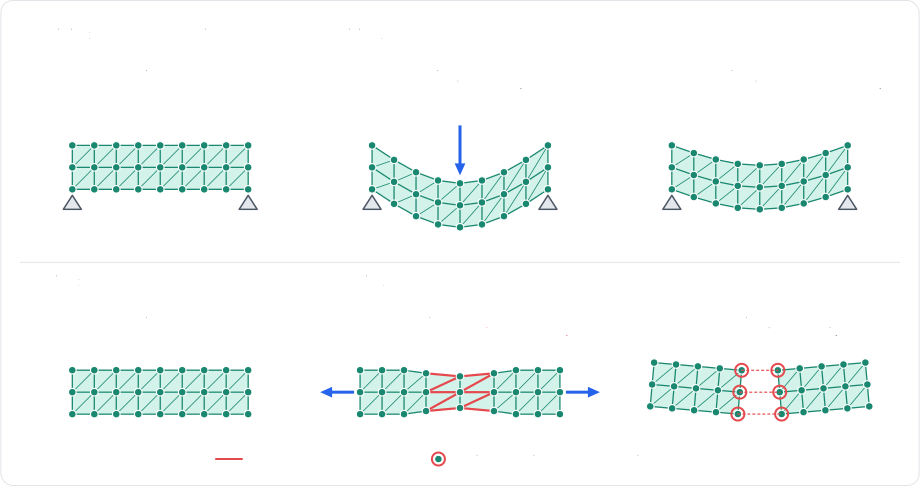
Both are supported by the constraints
solver
Plasticity
Plasticity is configured by the material of the body, separately for its cells and for its edges:
- A cell strained past its plastic yield
(
plastic_yieldplasticYieldplasticYieldplastic_yieldplastic_creepplasticCreepplasticCreepplastic_creepplastic_maxplasticMaxplasticMaxplastic_maxCorotationalandNeoHookeanCorotationalandNeoHookeanR3_SOFT_CELL_COROTATIONALandR3_SOFT_CELL_NEO_HOOKEANSoftBodyCellModel.COROTATIONALandSoftBodyCellModel.NEO_HOOKEANVolumeVolumeR3_SOFT_CELL_VOLUMESoftBodyCellModel.VOLUME - An edge strained past its edge plastic yield
(
edge_plastic_yieldedgePlasticYieldedgePlasticYieldedge_plastic_yield|length / rest_length - 1|) sees its rest length flow toward its current length at the rate of its edge plastic creep (edge_plastic_creepedgePlasticCreepedgePlasticCreepedge_plastic_creepedge_plastic_maxedgePlasticMaxedgePlasticMaxedge_plastic_maxedge_plastic_flowedgePlasticFlowedgePlasticFlowedge_plastic_flowSoftEdgePlasticFlow) selects whether that happens when it is squeezed, when it is stretched, or both.
A plastic deformation can be undone at any time
(SoftBody::reset_plasticityRapierSoftBody::reset_plasticitySoftBody.resetPlasticityr3SoftBody_ResetPlasticitySoftBody.reset_plasticity
- Example 2D
- Example 3D
// The jelly has elastic (corotational) cells: the plasticity of `Volume` cells has no effect.
let material = world.soft_bodies[jelly_handle].material_mut();
// Cells: the rest shape flows toward the current one past 5% strain, at a rate of 20 per
// second, up to a total permanent deformation of 50%.
material.plastic_yield = 0.05;
material.plastic_creep = 20.0;
material.plastic_max = 0.5;
// Edges: the rest length flows past 10% strain, up to half the initial length, but only
// when squeezed (a dent stays, a stretch springs back).
material.edge_plastic_yield = 0.1;
material.edge_plastic_creep = 10.0;
material.edge_plastic_max = 0.5;
material.edge_plastic_flow = SoftEdgePlasticFlow::Compression;
// Every permanent deformation can be undone at once.
world.soft_bodies[jelly_handle].reset_plasticity();
// The jelly has elastic (corotational) cells: the plasticity of `Volume` cells has no effect.
let material = world.soft_bodies[jelly_handle].material_mut();
// Cells: the rest shape flows toward the current one past 5% strain, at a rate of 20 per
// second, up to a total permanent deformation of 50%.
material.plastic_yield = 0.05;
material.plastic_creep = 20.0;
material.plastic_max = 0.5;
// Edges: the rest length flows past 10% strain, up to half the initial length, but only
// when squeezed (a dent stays, a stretch springs back).
material.edge_plastic_yield = 0.1;
material.edge_plastic_creep = 10.0;
material.edge_plastic_max = 0.5;
material.edge_plastic_flow = SoftEdgePlasticFlow::Compression;
// Every permanent deformation can be undone at once.
world.soft_bodies[jelly_handle].reset_plasticity();
- Example 2D
- Example 3D
// The jelly has elastic (corotational) cells: the plasticity of `Volume` cells has no effect.
let plasticMaterial = jelly.material();
// Cells: the rest shape flows toward the current one past 5% strain, at a rate of 20 per
// second, up to a total permanent deformation of 50%.
plasticMaterial.plasticYield = 0.05;
plasticMaterial.plasticCreep = 20.0;
plasticMaterial.plasticMax = 0.5;
// Edges: the rest length flows past 10% strain, up to half the initial length, but only
// when squeezed (a dent stays, a stretch springs back).
plasticMaterial.edgePlasticYield = 0.1;
plasticMaterial.edgePlasticCreep = 10.0;
plasticMaterial.edgePlasticMax = 0.5;
plasticMaterial.edgePlasticFlow = RAPIER.SoftEdgePlasticFlow.Compression;
jelly.setMaterial(plasticMaterial);
// Every permanent deformation can be undone at once.
jelly.resetPlasticity();
// The jelly has elastic (corotational) cells: the plasticity of `Volume` cells has no effect.
let plasticMaterial = jelly.material();
// Cells: the rest shape flows toward the current one past 5% strain, at a rate of 20 per
// second, up to a total permanent deformation of 50%.
plasticMaterial.plasticYield = 0.05;
plasticMaterial.plasticCreep = 20.0;
plasticMaterial.plasticMax = 0.5;
// Edges: the rest length flows past 10% strain, up to half the initial length, but only
// when squeezed (a dent stays, a stretch springs back).
plasticMaterial.edgePlasticYield = 0.1;
plasticMaterial.edgePlasticCreep = 10.0;
plasticMaterial.edgePlasticMax = 0.5;
plasticMaterial.edgePlasticFlow = RAPIER.SoftEdgePlasticFlow.Compression;
jelly.setMaterial(plasticMaterial);
// Every permanent deformation can be undone at once.
jelly.resetPlasticity();
The material is modified through the SoftBodyMaterial component of the soft-body entity:
- Example 2D
- Example 3D
fn configure_plasticity(
    mut context: WriteRapierContext,
    jelly: Single<(Entity, &mut SoftBodyMaterial), With<Jelly>>,
) -> Result {
    // The jelly has elastic (corotational) cells: the plasticity of `Volume` cells has no effect.
    let (entity, mut material) = jelly.into_inner();
    // Cells: the rest shape flows toward the current one past 5% strain, at a rate of 20 per
    // second, up to a total permanent deformation of 50%.
    material.plastic_yield = 0.05;
    material.plastic_creep = 20.0;
    material.plastic_max = 0.5;
    // Edges: the rest length flows past 10% strain, up to half the initial length, but only
    // when squeezed (a dent stays, a stretch springs back).
    material.edge_plastic_yield = 0.1;
    material.edge_plastic_creep = 10.0;
    material.edge_plastic_max = 0.5;
    material.edge_plastic_flow = SoftEdgePlasticFlow::Compression;
    // Every permanent deformation can be undone at once.
    if let Some(soft_body) = context.single_mut()?.soft_body_mut(entity) {
        soft_body.reset_plasticity();
    }
    Ok(())
}
fn configure_plasticity(
    mut context: WriteRapierContext,
    jelly: Single<(Entity, &mut SoftBodyMaterial), With<Jelly>>,
) -> Result {
    // The jelly has elastic (corotational) cells: the plasticity of `Volume` cells has no effect.
    let (entity, mut material) = jelly.into_inner();
    // Cells: the rest shape flows toward the current one past 5% strain, at a rate of 20 per
    // second, up to a total permanent deformation of 50%.
    material.plastic_yield = 0.05;
    material.plastic_creep = 20.0;
    material.plastic_max = 0.5;
    // Edges: the rest length flows past 10% strain, up to half the initial length, but only
    // when squeezed (a dent stays, a stretch springs back).
    material.edge_plastic_yield = 0.1;
    material.edge_plastic_creep = 10.0;
    material.edge_plastic_max = 0.5;
    material.edge_plastic_flow = SoftEdgePlasticFlow::Compression;
    // Every permanent deformation can be undone at once.
    if let Some(soft_body) = context.single_mut()?.soft_body_mut(entity) {
        soft_body.reset_plasticity();
    }
    Ok(())
}
The material is read with r3SoftBody_Material, which gives back a copy of the material of the body. That copy is
modified, then applied with r3SoftBody_SetMaterial:
- Example 2D
- Example 3D
// The jelly has elastic (corotational) cells: the plasticity of volume cells has no effect.
R2SoftBodyMaterial plastic_material = r2SoftBody_Material(jelly);
// Cells: the rest shape flows toward the current one past 5% strain, at a rate of 20 per
// second, up to a total permanent deformation of 50%.
plastic_material.plasticYield = 0.05;
plastic_material.plasticCreep = 20.0;
plastic_material.plasticMax = 0.5;
// Edges: the rest length flows past 10% strain, up to half the initial length, but only
// when squeezed (a dent stays, a stretch springs back).
plastic_material.edgePlasticYield = 0.1;
plastic_material.edgePlasticCreep = 10.0;
plastic_material.edgePlasticMax = 0.5;
plastic_material.edgePlasticFlow = R2_SOFT_EDGE_PLASTIC_FLOW_COMPRESSION;
r2SoftBody_SetMaterial(jelly, &plastic_material);
// Every permanent deformation can be undone at once.
r2SoftBody_ResetPlasticity(jelly);
// The jelly has elastic (corotational) cells: the plasticity of volume cells has no effect.
R3SoftBodyMaterial plastic_material = r3SoftBody_Material(jelly);
// Cells: the rest shape flows toward the current one past 5% strain, at a rate of 20 per
// second, up to a total permanent deformation of 50%.
plastic_material.plasticYield = 0.05;
plastic_material.plasticCreep = 20.0;
plastic_material.plasticMax = 0.5;
// Edges: the rest length flows past 10% strain, up to half the initial length, but only
// when squeezed (a dent stays, a stretch springs back).
plastic_material.edgePlasticYield = 0.1;
plastic_material.edgePlasticCreep = 10.0;
plastic_material.edgePlasticMax = 0.5;
plastic_material.edgePlasticFlow = R3_SOFT_EDGE_PLASTIC_FLOW_COMPRESSION;
r3SoftBody_SetMaterial(jelly, &plastic_material);
// Every permanent deformation can be undone at once.
r3SoftBody_ResetPlasticity(jelly);
The material property of a soft-body is a live view of its material (a SoftBodyMaterial): setting one of its fields
changes the body directly. Assigning a whole SoftBodyMaterial to it replaces the material, and its copy method
gives a detached copy:
# The jelly has elastic (corotational) cells: the plasticity of `VOLUME` cells has no effect.
jelly = world.soft_bodies[jelly_handle]
# A live view of the material: setting one of its fields changes the body.
material = jelly.material
# Cells: the rest shape flows toward the current one past 5% strain, at a rate of 20 per
# second, up to a total permanent deformation of 50%.
material.plastic_yield = 0.05
material.plastic_creep = 20.0
material.plastic_max = 0.5
# Edges: the rest length flows past 10% strain, up to half the initial length, but only
# when squeezed (a dent stays, a stretch springs back).
material.edge_plastic_yield = 0.1
material.edge_plastic_creep = 10.0
material.edge_plastic_max = 0.5
material.edge_plastic_flow = rp.SoftEdgePlasticFlow.COMPRESSION
# Every permanent deformation can be undone at once.
jelly.reset_plasticity()
Tearing
Tearing is configured by the material of the body as well. An element tears at the end of the timestep during which its load goes beyond one of the two thresholds of the material:
- The tear strain (
tear_straintearStraintearStraintear_strain - The tear force (
tear_forcetearForcetearForcetear_force
The other settings of the material shape how a tear propagates:
- The tear smoothing (
tear_smoothingtearSmoothingtearSmoothingtear_smoothing - The interior strength (
interior_strengthinteriorStrengthinteriorStrengthinterior_strength - The max tears per step (
max_tears_per_stepmaxTearsPerStepmaxTearsPerStepmax_tears_per_step - The min piece (
min_pieceminPieceminPiecemin_piece
Individual edges can be made tougher (or weaker, e.g., a perforation line) with their tear resistance, given to the
builder
(edge_tear_resistancesetEdgeTearResistanceedgeTearResistance field of R3SoftBodyDescSoftBodyBuilder.edge_tear_resistance
- Example 2D
- Example 3D
let material = world.soft_bodies[sheet_handle].material_mut();
// An edge tears past 40% of stretch, or past a force of 50 along its direction.
material.tear_strain = Some(0.4);
material.tear_force = Some(50.0);
// The load is smoothed over 0.1 second, so a single impact spike doesn't tear.
material.tear_smoothing = 0.1;
// Undamaged interior elements are twice as tough: tears start from the surface.
material.interior_strength = 2.0;
// A tear never splits off a piece smaller than 10 elements.
material.min_piece = Some(10);
let material = world.soft_bodies[cloth_handle].material_mut();
// An edge tears past 40% of stretch, or past a force of 50 along its direction.
material.tear_strain = Some(0.4);
material.tear_force = Some(50.0);
// The load is smoothed over 0.1 second, so a single impact spike doesn't tear.
material.tear_smoothing = 0.1;
// Undamaged interior elements are twice as tough: tears start from the surface.
material.interior_strength = 2.0;
// A tear never splits off a piece smaller than 10 elements.
material.min_piece = Some(10);
- Example 2D
- Example 3D
let tearMaterial = sheet.material();
// An edge tears past 40% of stretch, or past a force of 50 along its direction.
tearMaterial.tearStrain = 0.4;
tearMaterial.tearForce = 50.0;
// The load is smoothed over 0.1 second, so a single impact spike doesn't tear.
tearMaterial.tearSmoothing = 0.1;
// Undamaged interior elements are twice as tough: tears start from the surface.
tearMaterial.interiorStrength = 2.0;
// A tear never splits off a piece smaller than 10 elements.
tearMaterial.minPiece = 10;
sheet.setMaterial(tearMaterial);
let tearMaterial = cloth.material();
// An edge tears past 40% of stretch, or past a force of 50 along its direction.
tearMaterial.tearStrain = 0.4;
tearMaterial.tearForce = 50.0;
// The load is smoothed over 0.1 second, so a single impact spike doesn't tear.
tearMaterial.tearSmoothing = 0.1;
// Undamaged interior elements are twice as tough: tears start from the surface.
tearMaterial.interiorStrength = 2.0;
// A tear never splits off a piece smaller than 10 elements.
tearMaterial.minPiece = 10;
cloth.setMaterial(tearMaterial);
- Example 2D
- Example 3D
fn configure_tearing(mut commands: Commands, sheet: Single<Entity, With<Sheet>>) {
    commands
        .entity(*sheet)
        .insert(SoftBodyMaterial(RapierSoftBodyMaterial {
            // An edge tears past 40% of stretch, or past a force of 50 along its direction.
            tear_strain: Some(0.4),
            tear_force: Some(50.0),
            // The load is smoothed over 0.1 second, so a single impact spike doesn't tear.
            tear_smoothing: 0.1,
            // Undamaged interior elements are twice as tough: tears start from the surface.
            interior_strength: 2.0,
            // A tear never splits off a piece smaller than 10 elements.
            min_piece: Some(10),
            ..RapierSoftBodyMaterial::uniform(SpringCoefficients::new(30.0, 1.0))
        }));
}
fn configure_tearing(mut material: Single<&mut SoftBodyMaterial, With<Cloth>>) {
    // An edge tears past 40% of stretch, or past a force of 50 along its direction.
    material.tear_strain = Some(0.4);
    material.tear_force = Some(50.0);
    // The load is smoothed over 0.1 second, so a single impact spike doesn't tear.
    material.tear_smoothing = 0.1;
    // Undamaged interior elements are twice as tough: tears start from the surface.
    material.interior_strength = 2.0;
    // A tear never splits off a piece smaller than 10 elements.
    material.min_piece = Some(10);
}
The optional thresholds of the material (tearStrain, tearForce, and minPiece) are only used when the enabled
field of their R3OptionalReal or R3OptionalU32 is set. The tear resistance of the edges and of the clusters can
also be changed after the insertion, with r3SoftBody_SetEdgeTearResistance and r3SoftBody_SetClusterTearResistance:
- Example 2D
- Example 3D
R2SoftBodyMaterial tear_material = r2SoftBody_Material(sheet);
// An edge tears past 40% of stretch, or past a force of 50 along its direction.
tear_material.tearStrain = (R2OptionalReal){1, 0.4};
tear_material.tearForce = (R2OptionalReal){1, 50.0};
// The load is smoothed over 0.1 second, so a single impact spike doesn't tear.
tear_material.tearSmoothing = 0.1;
// Undamaged interior elements are twice as tough: tears start from the surface.
tear_material.interiorStrength = 2.0;
// A tear never splits off a piece smaller than 10 elements.
tear_material.minPiece = (R2OptionalU32){1, 10};
r2SoftBody_SetMaterial(sheet, &tear_material);
R3SoftBodyMaterial tear_material = r3SoftBody_Material(cloth);
// An edge tears past 40% of stretch, or past a force of 50 along its direction.
tear_material.tearStrain = (R3OptionalReal){1, 0.4};
tear_material.tearForce = (R3OptionalReal){1, 50.0};
// The load is smoothed over 0.1 second, so a single impact spike doesn't tear.
tear_material.tearSmoothing = 0.1;
// Undamaged interior elements are twice as tough: tears start from the surface.
tear_material.interiorStrength = 2.0;
// A tear never splits off a piece smaller than 10 elements.
tear_material.minPiece = (R3OptionalU32){1, 10};
r3SoftBody_SetMaterial(cloth, &tear_material);
The optional thresholds of the material (tear_strain, tear_force, and min_piece) are disabled when they are set
to None. As for the plasticity, they are set through the live view of the material of the soft-body:
material = world.soft_bodies[cloth_handle].material
# An edge tears past 40% of stretch, or past a force of 50 along its direction (`None`
# disables a threshold).
material.tear_strain = 0.4
material.tear_force = 50.0
# The load is smoothed over 0.1 second, so a single impact spike doesn't tear.
material.tear_smoothing = 0.1
# Undamaged interior elements are twice as tough: tears start from the surface.
material.interior_strength = 2.0
# A tear never splits off a piece smaller than 10 elements.
material.min_piece = 10
The tear resistance of the edges is given to the builder as a list of (edge index, resistance) pairs. It can also be
changed after the insertion, for the edges and the cells with SoftBody.set_edge_tear_resistance and
SoftBody.set_cell_tear_resistance, and for the clusters with SoftBody.set_cluster_tear_resistance:
# A perforation line: these edges tear at half the load of the others (1.0 restores the
# threshold of the material).
perforated = rp.SoftBody.rope((0.0, 6.0, -3.0), (3.0, 6.0, -3.0), 30).edge_tear_resistance(
    [(14, 0.5), (15, 0.5)]
)
perforated_handle = world.add_soft_body(perforated)
# The same, after the insertion.
cloth = world.soft_bodies[cloth_handle]
for edge in (30, 31, 32):
    cloth.set_edge_tear_resistance(edge, 0.5)
# Every element of the root cluster of the jelly (i.e., of the whole body) is twice as
# tough, and its first cell three times as tough.
jelly = world.soft_bodies[jelly_handle]
jelly.set_cluster_tear_resistance(0, 2.0)
jelly.set_cell_tear_resistance(0, 3.0)
A tear can also be requested explicitly, either edge by edge
(SoftBody::tear_edge, tear_cellRapierSoftBody::tear_edge, tear_cellSoftBody.tearEdge, tearCellr3SoftBody_TearEdge, r3SoftBody_TearCellSoftBody.tear_edge, tear_cellPhysicsWorld::tear_soft_bodyRapierContextMut::tear_soft_bodyWorld.tearSoftBodyr3SoftBody_TearPhysicsWorld.tear_soft_bodyPhysicsWorld::cut_soft_bodyRapierContextMut::cut_soft_bodyWorld.cutSoftBodyr3CutSoftBodyPhysicsWorld.cut_soft_body
Tearing and cutting lose no material: the particles are duplicated along the tear instead of being removed, so the area (2D) or the volume (3D) of the body is preserved. The pieces a tear disconnects become soft-bodies of their own, which keep the material and the settings of the body they come from, the deformable meshes and the joints following the pieces they were attached to. Therefore the particles of the torn body are renumbered, and the returned event tells where each of them went:
- Example 2D
- Example 3D
// Elements tear on their own past the material's thresholds; a tear can also be requested.
world.soft_bodies[sheet_handle].tear_edge(10); // Applied at the end of the next step.
                                               // Tear at once along edges and through cells; pieces the tear disconnects become soft
                                               // bodies of their own.
let event = world.tear_soft_body(sheet_handle, &[11, 12], &[]);
if let Some(event) = event {
    println!("{} edges torn", event.torn_edges.len());
}
// Cut along a blade (a segment in 2D), without removing material.
let blade = [Vector::new(-3.0, -10.0), Vector::new(-3.0, 10.0)];
if let Some(event) = world.cut_soft_body(sheet_handle, &blade) {
    for piece in &event.pieces {
        println!(
            "piece {:?} has {} particles",
            piece.soft_body,
            piece.particles.len()
        );
    }
    // Where a particle of the torn body went.
    if let Some((body, index)) = event.particle_destination(n as u32 * n as u32 - 1) {
        println!(
            "particle {} is now particle {} of {:?}",
            n * n - 1,
            index,
            body
        );
    }
}
// Elements tear on their own past the material's thresholds; a tear can also be requested.
world.soft_bodies[cloth_handle].tear_edge(10); // Applied at the end of the next step.
                                               // Tear at once along edges and through cells; pieces the tear disconnects become soft
                                               // bodies of their own.
let event = world.tear_soft_body(cloth_handle, &[11, 12], &[]);
if let Some(event) = event {
    println!("{} edges torn", event.torn_edges.len());
}
// Cut along a blade (a triangle in 3D), without removing material.
let blade = [
    Vector::new(-0.1, -10.0, -10.0),
    Vector::new(-0.1, 10.0, 0.0),
    Vector::new(-0.1, -10.0, 10.0),
];
if let Some(event) = world.cut_soft_body(cloth_handle, &blade) {
    for piece in &event.pieces {
        println!(
            "piece {:?} has {} particles",
            piece.soft_body,
            piece.particles.len()
        );
    }
    // Where a particle of the torn body went.
    if let Some((body, index)) = event.particle_destination(n as u32 * n as u32 - 1) {
        println!(
            "particle {} is now particle {} of {:?}",
            n * n - 1,
            index,
            body
        );
    }
}
- Example 2D
- Example 3D
// Elements tear on their own past the material's thresholds; a tear can also be requested.
sheet.tearEdge(10); // Applied at the end of the next step.
// Tear at once along edges and through cells; pieces the tear disconnects become soft
// bodies of their own.
let tear = world.tearSoftBody(sheet, [11, 12], []);
if (tear) {
    console.log(tear.tornEdges().length / 2, "edges torn");
    tear.free();
}
// Cut along a blade (a segment in 2D), without removing material.
let cut = world.cutSoftBody(sheet, [{ x: -3.0, y: -10.0 }, { x: -3.0, y: 10.0 }]);
if (cut) {
    for (let i = 0; i < cut.numPieces(); ++i) {
        let piece = world.getSoftBody(cut.pieceSoftBody(i));
        console.log("piece", i, "has", piece.numParticles(), "particles");
    }
    // Where a particle of the torn body went.
    let destination = cut.particleDestination(n * n - 1);
    if (destination) {
        console.log("particle", n * n - 1, "is now particle", destination.particle, "of", destination.softBody);
    }
    cut.free();
}
// Elements tear on their own past the material's thresholds; a tear can also be requested.
cloth.tearEdge(10); // Applied at the end of the next step.
// Tear at once along edges and through cells; pieces the tear disconnects become soft
// bodies of their own.
let tear = world.tearSoftBody(cloth, [11, 12], []);
if (tear) {
    console.log(tear.tornEdges().length / 2, "edges torn");
    tear.free();
}
// Cut along a blade (a triangle in 3D), without removing material.
let cut = world.cutSoftBody(cloth, [
    { x: -0.1, y: -10.0, z: -10.0 }, { x: -0.1, y: 10.0, z: 0.0 }, { x: -0.1, y: -10.0, z: 10.0 },
]);
if (cut) {
    for (let i = 0; i < cut.numPieces(); ++i) {
        let piece = world.getSoftBody(cut.pieceSoftBody(i));
        console.log("piece", i, "has", piece.numParticles(), "particles");
    }
    // Where a particle of the torn body went.
    let destination = cut.particleDestination(n * n - 1);
    if (destination) {
        console.log("particle", n * n - 1, "is now particle", destination.particle, "of", destination.softBody);
    }
    cut.free();
}
The largest piece keeps the torn soft-body and its entity, whereas a new entity is spawned for each other piece. That
entity receives a clone of the components of the torn entity (its material, its mesh synchronization, its render
components, your own components, etc.) during the next writeback of the physics state, except for the components
referring to the particles by index (SoftBodyPinnedParticles, SoftBodyKinematicTargets, SoftBodyAttachments,
SoftBodyExternalForce, and SoftBodyExternalImpulse): these are remapped to the renumbered particles, the entries of
the particles moved to a piece being moved to the entity of that piece. The particles pinned by the builder of the
SoftBody component (restored when the SoftBodyPinnedParticles component is removed) are remapped the same way.
Similarly, the cluster entities follow the pieces holding their particles, and a new
cluster entity is spawned for each piece of a split cluster that is given a proxy of its own. That entity inherits the
SoftBodyClusterPinned, SoftBodyClusterKinematicTarget (shifted so that the particles keep their targets),
SoftBodyClusterShapeMatching, and SoftBodyClusterMaterial components of the entity of the split cluster.
The pieces of the tears generated by the simulation get their entities during the writeback of the physics state,
whereas tear_soft_body and cut_soft_body spawn the entities of the pieces right away with the Commands they are
given. These are returned in a SoftBodyTearResult (the first piece being the torn entity itself), next to the event
of Rapier (its raw field) which identifies the pieces by their handle. Note however that these entities only receive
their components during the next writeback, when the SoftBodyTearEvent message described in the
next section is sent (and the entities of the split clusters are only spawned
then):
- Example 2D
- Example 3D
fn tear_sheet(
    mut commands: Commands,
    mut context: WriteRapierContext,
    sheet: Single<Entity, With<Sheet>>,
) -> Result {
    let mut context = context.single_mut()?;
    // Elements tear on their own past the material's thresholds; a tear can also be requested.
    if let Some(soft_body) = context.soft_body_mut(*sheet) {
        soft_body.tear_edge(10); // Applied at the end of the next step.
    }
    // Tear at once along edges and through cells. The pieces the tear disconnects become soft
    // bodies of their own, which entities are spawned right away with `commands`.
    if let Some(tear) = context.tear_soft_body(&mut commands, *sheet, &[11, 12], &[]) {
        println!("{} edges torn", tear.raw.torn_edges.len());
    }
    // Cut along a blade (a world-space segment in 2D), without removing material.
    let blade = [Vec2::new(-3.0, -10.0), Vec2::new(-3.0, 10.0)];
    if let Some(tear) = context.cut_soft_body(&mut commands, *sheet, &blade) {
        // The entities of the pieces (the first one being the torn entity) are known right away,
        // but they only get their components during the next writeback of the physics state.
        for (entity, piece) in tear.pieces.iter().zip(&tear.raw.pieces) {
            println!("piece {entity} has {} particles", piece.particles.len());
        }
    }
    Ok(())
}
fn tear_cloth(
    mut commands: Commands,
    mut context: WriteRapierContext,
    cloth: Single<Entity, With<Cloth>>,
) -> Result {
    let mut context = context.single_mut()?;
    // Elements tear on their own past the material's thresholds; a tear can also be requested.
    if let Some(soft_body) = context.soft_body_mut(*cloth) {
        soft_body.tear_edge(10); // Applied at the end of the next step.
    }
    // Tear at once along edges and through cells. The pieces the tear disconnects become soft
    // bodies of their own, which entities are spawned right away with `commands`.
    if let Some(tear) = context.tear_soft_body(&mut commands, *cloth, &[11, 12], &[]) {
        println!("{} edges torn", tear.raw.torn_edges.len());
    }
    // Cut along a blade (a world-space triangle in 3D), without removing material.
    let blade = [
        Vec3::new(-0.1, -10.0, -10.0),
        Vec3::new(-0.1, 10.0, 0.0),
        Vec3::new(-0.1, -10.0, 10.0),
    ];
    if let Some(tear) = context.cut_soft_body(&mut commands, *cloth, &blade) {
        // The entities of the pieces (the first one being the torn entity) are known right away,
        // but they only get their components during the next writeback of the physics state.
        for (entity, piece) in tear.pieces.iter().zip(&tear.raw.pieces) {
            println!("piece {entity} has {} particles", piece.particles.len());
        }
    }
    Ok(())
}
The event returned by r3SoftBody_Tear and r3CutSoftBody is an owned R3SoftBodyTearEvent, to be freed with
r3FreeSoftBodyTearEvent, or NULL if the tear or the cut changed nothing. It is read with the following functions:
r3SoftBodyTearEvent_SoftBodygives the torn soft-body, andr3SoftBodyTearEvent_Bodiesthe soft-bodies it is now made of: the torn body alone if nothing was split off, or its pieces otherwise, the piece keeping the handle of the torn body first (r3SoftBodyTearEvent_PieceCountgives their number). The particles of thei-th of them (i.e., their indices in the torn body) are given byr3SoftBodyTearEvent_PieceParticles.r3SoftBodyTearEvent_TryParticleDestinationtells in which soft-body a particle of the torn body is now, and what its index is there (r3SoftBodyTearEvent_ParticleDestinationdoes the same, but reports the particles without any destination as anR3_NOT_FOUNDerror).r3SoftBodyTearEvent_TornEdges,r3SoftBodyTearEvent_TornCells,r3SoftBodyTearEvent_RemovedEdges,r3SoftBodyTearEvent_SplitParticles, andr3SoftBodyTearEvent_InsertedParticlesgive the details of the change of topology, as flat arrays of particle indices.r3SoftBodyTearEvent_Clustersandr3SoftBodyTearEvent_MovedJointsgive the clusters the tear split, and the joints it moved from a cluster proxy to another.
The arrays are copied with the usual output-buffer protocol: each function returns the number of elements, and copies
them into the given buffer only if its capacity is large enough (a NULL buffer with a capacity of zero gives that
number first). Finally, r3SoftBody_TopologyVersion changes whenever the
connectivity of the particles of a body changes, which is a convenient way of knowing when the render meshes must be
rebuilt:
- Example 2D
- Example 3D
// Elements tear on their own past the material's thresholds; a tear can also be requested.
r2SoftBody_TearEdge(sheet, 10); // Applied at the end of the next step.
// Tear at once along edges and through cells; pieces the tear disconnects become soft
// bodies of their own. The event is NULL if nothing changed.
uint32_t torn_edges[] = {11, 12};
R2SoftBodyTearEvent *tear = r2SoftBody_Tear(sheet, torn_edges, 2, NULL, 0);
if (tear != NULL) {
    printf("%zu edges torn\n", r2SoftBodyTearEvent_TornEdges(tear, NULL, 0) / 2);
    r2FreeSoftBodyTearEvent(tear);
}
// Cut along a blade (a segment in 2D), without removing material.
R2Vector blade[2] = {{-3.0, -10.0}, {-3.0, 10.0}};
R2SoftBodyTearEvent *cut = r2CutSoftBody(sheet, blade);
if (cut != NULL) {
    // The soft-bodies the sheet is now made of, the one keeping its handle first.
    size_t num_pieces = r2SoftBodyTearEvent_PieceCount(cut);
    R2SoftBodyHandle *pieces = malloc(num_pieces * sizeof(R2SoftBodyHandle));
    r2SoftBodyTearEvent_Bodies(cut, pieces, num_pieces);
    for (size_t i = 0; i < num_pieces; i++) {
        size_t num_piece_particles = r2SoftBodyTearEvent_PieceParticles(cut, i, NULL, 0);
        printf("piece %u has %zu particles\n", pieces[i].index, num_piece_particles);
    }
    free(pieces);
    // Where a particle of the torn body went.
    R2OptionalParticleDestination destination = r2SoftBodyTearEvent_TryParticleDestination(cut, n * n - 1);
    if (destination.found) {
        printf("particle %u is now particle %u of %u\n", n * n - 1, destination.index,
               destination.body.index);
    }
    r2FreeSoftBodyTearEvent(cut);
}
// Elements tear on their own past the material's thresholds; a tear can also be requested.
r3SoftBody_TearEdge(cloth, 10); // Applied at the end of the next step.
// Tear at once along edges and through cells; pieces the tear disconnects become soft
// bodies of their own. The event is NULL if nothing changed.
uint32_t torn_edges[] = {11, 12};
R3SoftBodyTearEvent *tear = r3SoftBody_Tear(cloth, torn_edges, 2, NULL, 0);
if (tear != NULL) {
    printf("%zu edges torn\n", r3SoftBodyTearEvent_TornEdges(tear, NULL, 0) / 2);
    r3FreeSoftBodyTearEvent(tear);
}
// Cut along a blade (a triangle in 3D), without removing material.
R3Vector blade[3] = {{-0.1, -10.0, -10.0}, {-0.1, 10.0, 0.0}, {-0.1, -10.0, 10.0}};
R3SoftBodyTearEvent *cut = r3CutSoftBody(cloth, blade);
if (cut != NULL) {
    // The soft-bodies the cloth is now made of, the one keeping its handle first.
    size_t num_pieces = r3SoftBodyTearEvent_PieceCount(cut);
    R3SoftBodyHandle *pieces = malloc(num_pieces * sizeof(R3SoftBodyHandle));
    r3SoftBodyTearEvent_Bodies(cut, pieces, num_pieces);
    for (size_t i = 0; i < num_pieces; i++) {
        size_t num_piece_particles = r3SoftBodyTearEvent_PieceParticles(cut, i, NULL, 0);
        printf("piece %u has %zu particles\n", pieces[i].index, num_piece_particles);
    }
    free(pieces);
    // Where a particle of the torn body went.
    R3OptionalParticleDestination destination = r3SoftBodyTearEvent_TryParticleDestination(cut, n * n - 1);
    if (destination.found) {
        printf("particle %u is now particle %u of %u\n", n * n - 1, destination.index,
               destination.body.index);
    }
    r3FreeSoftBodyTearEvent(cut);
}
PhysicsWorld.tear_soft_body and PhysicsWorld.cut_soft_body (or SoftBodySet.tear and SoftBodySet.cut when the
sets are used directly) return a SoftBodyTearEvent, or None if the tear or the cut changed nothing:
soft_bodyis the torn soft-body, andbodies()the soft-bodies it is now made of: the torn body alone if nothing was split off, or its pieces otherwise. Thepiecesproperty lists these pieces (empty if nothing was split off), the piece keeping the handle of the torn body first, eachSoftBodyPiecegiving itssoft_bodyand itsparticles(i.e., their indices in the torn body).particle_destination(i)tells in which soft-body a particle of the torn body is now, and what its index is there, as a(handle, index)tuple (orNoneif the particle has no destination).torn_edges,torn_cells, andremoved_edgesgive the particles of the elements involved in the change of topology as NumPy arrays.split_particlesgives the particles the tear duplicated, as(copy, source)pairs, andinserted_particlesthe particles it inserted.clustersandmoved_jointsgive the clusters the tear split, and the joints it moved from a cluster proxy to another.
A soft-body split off by a tear remembers the body it comes from (SoftBody.origin), and the torn body lists the ones
split off it (SoftBody.pieces). Finally, SoftBody.topology_version changes whenever the connectivity of the
particles of a body changes, which is a convenient way of knowing when the render meshes must be rebuilt:
# Elements tear on their own past the material's thresholds; a tear can also be requested.
world.soft_bodies[cloth_handle].tear_edge(10)  # Applied at the end of the next step.
# Tear at once along edges and through cells; pieces the tear disconnects become soft
# bodies of their own.
event = world.tear_soft_body(cloth_handle, [11, 12], [])
if event is not None:
    print(f"{len(event.torn_edges)} edges torn")
# Cut along a blade (a triangle), without removing material.
blade = ((-0.1, -10.0, -10.0), (-0.1, 10.0, 0.0), (-0.1, -10.0, 10.0))
event = world.cut_soft_body(cloth_handle, blade)
if event is not None:
    for piece in event.pieces:
        print(f"piece {piece.soft_body} has {len(piece.particles)} particles")
    # Where a particle of the torn body went.
    destination = event.particle_destination(n * n - 1)
    if destination is not None:
        body, index = destination
        print(f"particle {n * n - 1} is now particle {index} of {body}")
# The connectivity of the cloth changed: its render mesh must be rebuilt.
assert world.soft_bodies[cloth_handle].topology_version > 0
Tearing one edge with
SoftBody::tear_edgeRapierSoftBody::tear_edgeSoftBody.tearEdger3SoftBody_TearEdgeSoftBody.tear_edgePhysicsWorldRapierContextMutWorldr3SoftBody_Tear and r3CutSoftBody)PhysicsWorld
Volume cells never tear. Therefore a body which cells use the VolumeVolumeR3_SOFT_CELL_VOLUMESoftBodyCellModel.VOLUMECorotational or the NeoHookeanCorotational or the NeoHookeanR3_SOFT_CELL_COROTATIONAL or the R3_SOFT_CELL_NEO_HOOKEANSoftBodyCellModel.COROTATIONAL or the SoftBodyCellModel.NEO_HOOKEAN