character_controller_stairs
If enabled, the autostep setting allows the character to climb stairs automatically and walk over small obstacles. Autostepping requires the following parameters:
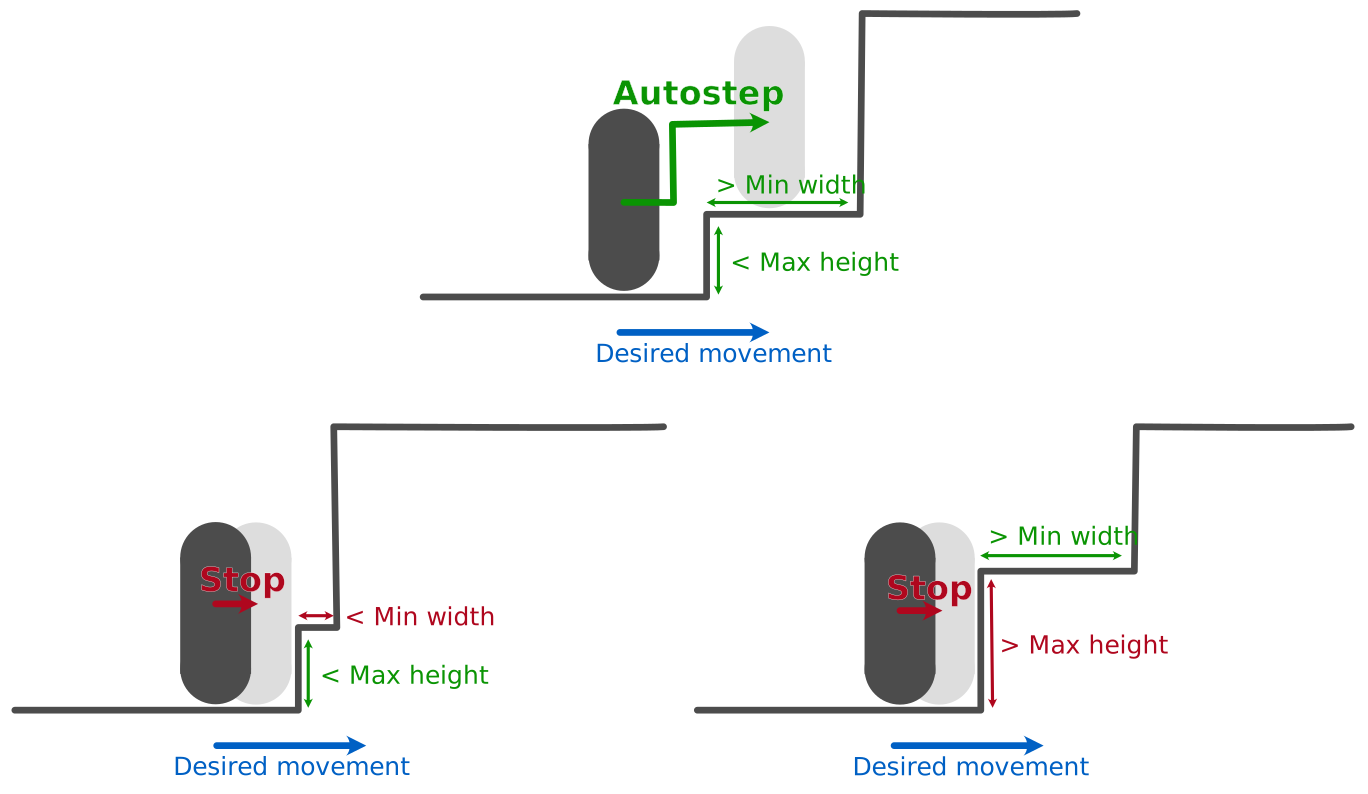
- The maximum height the character can step over. If the vertical movement needed to step over this obstacle is larger than this value, then the character will be stopped by the obstacle.
- The minimum (horizontal) width available on top of the obstacle. If, after the character is teleported on top of the obstacle, it cannot move forward by a distance larger than this minimum width, then the character will just be stopped by the obstacle (without being moved to the top of the obstacle).
- Whether or not autostepping is enabled for dynamic bodies. If it is not enabled for dynamic bodies, the character won’t attempt to automatically step over small dynamic bodies. Disabling this can be useful if we want the character to push these small objects (see collisions) instead of just stepping over them.
The following depicts (top) one configuration where all the autostepping conditions are satisfied, and, (bottom) two configurations where these conditions are not all satisfied (left: because the width of the step is too small, right: because the height of the step is too large):
Autostepping will only activate if the character is touching the floor right before the obstacle. This prevents the player from being teleported on to of a platform while it is in the air.
// Set autostep to None to disable it.
character_controller.autostep = None;
// Autostep if the step height is smaller than 0.5, and its width larger than 0.2.
character_controller.autostep = Some(CharacterAutostep {
    max_height: CharacterLength::Absolute(0.5),
    min_width: CharacterLength::Absolute(0.2),
    include_dynamic_bodies: true,
});
// Autostep if the step height is smaller than 0.3 multiplied by the character’s height,
// and its width larger than 0.5 multiplied by the character’s width (i.e. half the character’s
// width).
character_controller.autostep = Some(CharacterAutostep {
    max_height: CharacterLength::Relative(0.3),
    min_width: CharacterLength::Relative(0.5),
    include_dynamic_bodies: true,
});
/* Configure the character controller when the collider is created. */
// Autostep if the step height is smaller than 0.5, and its width larger than 0.2.
commands
    .spawn(Collider::ball(0.5))
    .insert(KinematicCharacterController {
        autostep: Some(CharacterAutostep {
            max_height: CharacterLength::Absolute(0.5),
            min_width: CharacterLength::Absolute(0.2),
            include_dynamic_bodies: true,
        }),
        ..default()
    });

// Autostep if the step height is smaller than 0.3 multiplied by the character’s height,
// and its width larger than 0.5 multiplied by the character’s width (i.e. half the character’s
// width).
commands
    .spawn(Collider::ball(0.5))
    .insert(KinematicCharacterController {
        autostep: Some(CharacterAutostep {
            max_height: CharacterLength::Relative(0.3),
            min_width: CharacterLength::Relative(0.5),
            include_dynamic_bodies: true,
        }),
        ..default()
    });
/* Configure autostep inside of a system. */
fn modify_character_controller_autostep(
    mut character_controllers: Query<&mut KinematicCharacterController>,
) {
    for mut character_controller in character_controllers.iter_mut() {
        character_controller.autostep = Some(CharacterAutostep {
            max_height: CharacterLength::Absolute(0.5),
            min_width: CharacterLength::Absolute(0.2),
            include_dynamic_bodies: true,
        });
    }
}
let characterController = world.createCharacterController(0.01);
// Autostep if the step height is smaller than 0.5, its width is larger than 0.2,
// and allow stepping on dynamic bodies.
characterController.enableAutostep(0.5, 0.2, true);
// Disable autostep.
characterController.disableAutostep();
Autostepping is configured with r3KinematicCharacterController_SetAutostep, which takes whether it is enabled, the
maximum height and minimum width (both as R3CharacterLength, see the
character offset), and whether it is enabled for dynamic bodies. The
current settings are given by r3KinematicCharacterController_Autostep as an R3CharacterAutostep structure:
// Set `enabled` (the second argument) to 0 to disable autostep (the other arguments are then ignored).
r2KinematicCharacterController_SetAutostep(character_controller, 0, (R2CharacterLength){0},
                                           (R2CharacterLength){0}, 0);
// Autostep if the step height is smaller than 0.5, and its width larger than 0.2.
r2KinematicCharacterController_SetAutostep(
    character_controller, 1,
    (R2CharacterLength){.value = 0.5, .relative = 0}, // The maximum height.
    (R2CharacterLength){.value = 0.2, .relative = 0}, // The minimum width.
    1);                                               // Include dynamic bodies.
// Autostep if the step height is smaller than 0.3 multiplied by the character's height,
// and its width larger than 0.5 multiplied by the character's width (i.e. half the character's
// width).
r2KinematicCharacterController_SetAutostep(
    character_controller, 1,
    (R2CharacterLength){.value = 0.3, .relative = 1}, // The maximum height.
    (R2CharacterLength){.value = 0.5, .relative = 1}, // The minimum width.
    1);                                               // Include dynamic bodies.
Autostepping is configured with the autostep property: either None (the default) to disable it, or a
CharacterAutostep created from the maximum height and minimum width (both as CharacterLength, see the
character offset), and whether it is enabled for dynamic bodies:
# Set autostep to None to disable it.
character_controller.autostep = None
# Autostep if the step height is smaller than 0.5, and its width larger than 0.2.
character_controller.autostep = rp.CharacterAutostep(
    max_height=rp.CharacterLength.absolute(0.5),
    min_width=rp.CharacterLength.absolute(0.2),
    include_dynamic_bodies=True,
)
# Autostep if the step height is smaller than 0.3 multiplied by the character’s height,
# and its width larger than 0.5 multiplied by the character’s width (i.e. half the character’s
# width).
character_controller.autostep = rp.CharacterAutostep(
    max_height=rp.CharacterLength.relative(0.3),
    min_width=rp.CharacterLength.relative(0.5),
    include_dynamic_bodies=True,
)