soft_body_contacts
A soft-body collides through the collider covering its surface, which is a deformable triangle-mesh (a polyline in 2D) built from the template given to the builder.
Thickness
The radius of the particles
(the particleRadius field of R3SoftBodyDesc) is
the thickness of the soft-body wrt. collision-detection: it is the contact skin of its surface collider, i.e., the
distance kept between the surface and the objects touching it, as well as the distance the solver bounds the motion of
one particle by at each substep. A radius that is too small relative to the distance between two neighboring particles
may let thin objects pass through the surface, whereas a radius larger than that distance will make the body collide
with itself even when it is at rest. Therefore it is recommended to keep it well below the distance between two
neighboring particles. Note that every constructor picks a sensible default, i.e., about half the length of its edges
or of its cells.
Oriented surfaces and shells
A closed surface (a balloon, a jelly cube, a filled polygon) is oriented: its contacts are generated on its outward
side only, like for an oriented triangle-mesh, so nothing is held
inside it. An open surface (a rope, a cloth) is two-sided, because a body arriving from either side must be stopped.
This is what the builder does by default, and it is what a solid body wants. A shell, i.e., a closed surface which
inner side must hold the bodies contained in it, is obtained by asking for a surface that is not oriented
(the oriented field of R3SoftBodyDesc):
- Example 2D
- Example 3D
// A shell: a closed surface that is not oriented, so its inner side holds the bodies put
// inside it (a bowl, a box, a container). A closed surface is oriented by default.
R2SoftBodyDesc bowl = r2DiskSoftBodyDesc(r2Vector(-3.0, 2.0), 0.8, 24);
// Default: disabled, i.e., oriented if the surface is closed.
bowl.oriented = (R2OptionalBool){1, 0};
bowl.material = r2UniformSoftBodyMaterial((R2SpringCoefficients){60.0, 1.0});
R2SoftBodyHandle bowl_handle = r2InsertSoftBody(world, &bowl);
// A shell: a closed surface that is not oriented, so its inner side holds the bodies put
// inside it (a bowl, a box, a container). A closed surface is oriented by default.
R3SoftBodyDesc bowl = r3SphereSoftBodyDesc(r3Vector(-3.0, 2.0, 0.0), 0.8, 2);
// Default: disabled, i.e., oriented if the surface is closed.
bowl.oriented = (R3OptionalBool){1, 0};
bowl.material = r3UniformSoftBodyMaterial((R3SpringCoefficients){60.0, 1.0});
R3SoftBodyHandle bowl_handle = r3InsertSoftBody(world, &bowl);
After the insertion, the shape of the surface collider (given by r3SoftBody_MeshColliders) is
the authority: the flag is changed there, like for any other collider.
Self-contacts
A soft-body doesn't collide with itself by default. Self-contacts are enabled by
the selfContacts field of R3SoftBodyDesc,
which makes the vertices and the edges of the surface collide with the surface of their own body: this is what keeps
a cloth folding onto itself, or a jelly squashed against itself, from passing through itself. Note that they are more
expensive, since the whole surface must be tested against itself.
Penetrations and tangles
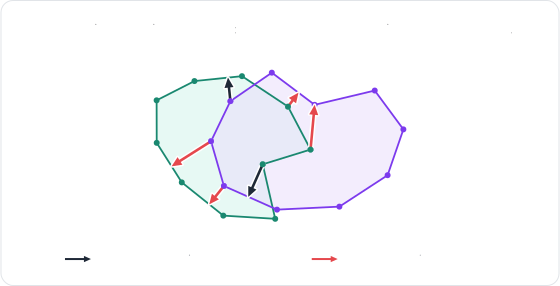
The contacts between two meshes are computed triangle by triangle (segment by segment in 2D), without any notion of their interiors. As long as the two surfaces don't penetrate, this works well. But as soon as they do, some of these local contacts start pointing the wrong way, and actively keep the two surfaces in their penetrating state instead of separating them. Deformations make it worse, since a single surface can also cross itself and end up tangled:
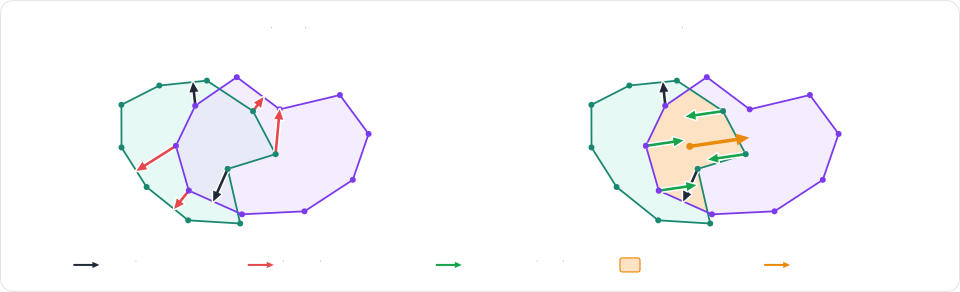
Rapier handles these configurations by measuring the volume of the overlap between the two surfaces. The gradient of that volume gives a good approximation of the direction separating the two bodies, aka. the volume normal, which is used both to push the overlapping regions apart, and to correct the direction of the local contacts inside them:
This is enabled by default for the closed surfaces, against other soft-bodies as well as against rigid colliders.
It is configured, along with the detection and the recovery of the tangled configurations, by the recovery settings of
the global settings
(softBodies.recovery of R3IntegrationParameters).
Every mechanism can be switched off individually, and the table below lists the ones to look at for the most common
problems:
| Problem | What to change |
|---|---|
| Thin or fast objects pass through a surface. | Raise the particle radius (particleRadius). Let the body request more substeps while it is hit fast (maxExtraSubsteps). |
| Two bodies crossing corner-first don't collide. | Enable edgeSpeculation (note that it can leave pressed 3D piles crossed). |
| A body stays tangled with itself. | Keep selfStandDown enabled (the default), which lets the elasticity untangle it, or push the crossed features apart with crossingRepulsion. |
| The recovery from a penetration is too slow, or too violent. | Change the recoveryPace, i.e., the corrective speed allowed to the recovery (in length units per second). |
| Soft contacts feel too spongy. | Raise the contactStiffening of the soft-body contacts relative to the rigid ones. |
| The overlap of two bodies isn't resolved at all. | Make sure both surfaces are closed: the intersection-volume constraints (overlapConstraints) only apply to them. |
Each of these settings has its own setter (and getter), named after its field: r3SoftBodiesSetMaxExtraSubsteps and
r3SoftBodiesSetContactStiffening for the settings of the soft-bodies, and r3RecoverySetEdgeSpeculation,
r3RecoverySetSelfStandDown, r3RecoverySetCrossingRepulsion, etc. for the recovery settings. See the
global settings for an example.