soft_body_deformable_colliders
Games don't need the simulated shape of a body to be as detailed as its visual shape: a coarse and well-shaped lattice is faster and more stable to simulate than one cell per visual triangle. This is why Rapier supports cage simulation and skinning. The detailed mesh is embedded in a coarse volumetric lattice, aka. its cage, which is the only part being simulated. The vertices of the mesh are then interpolated from the deformed cells holding them, aka. skinning:
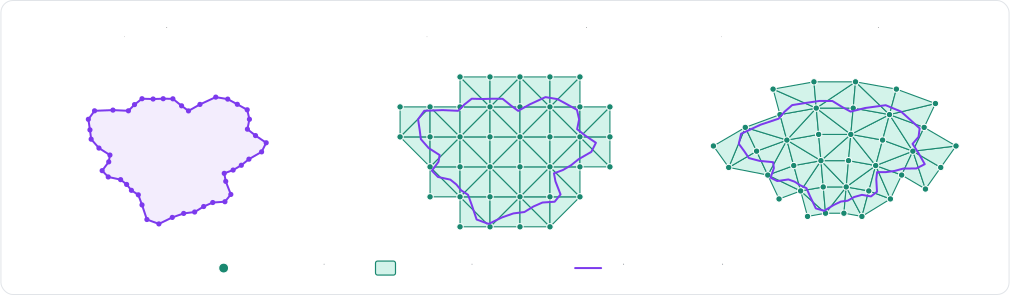
Skinned soft-bodies
The
SoftBodyDesc.volumetric
constructor computes the cage of a closed mesh automatically when its last argument is true, and keeps the
mesh as the skin of the body. That automatic cage is built for performance rather than geometric fidelity: in 3D, it
encloses the whole mesh with the tetrahedra of a lattice, without snapping them to the mesh:
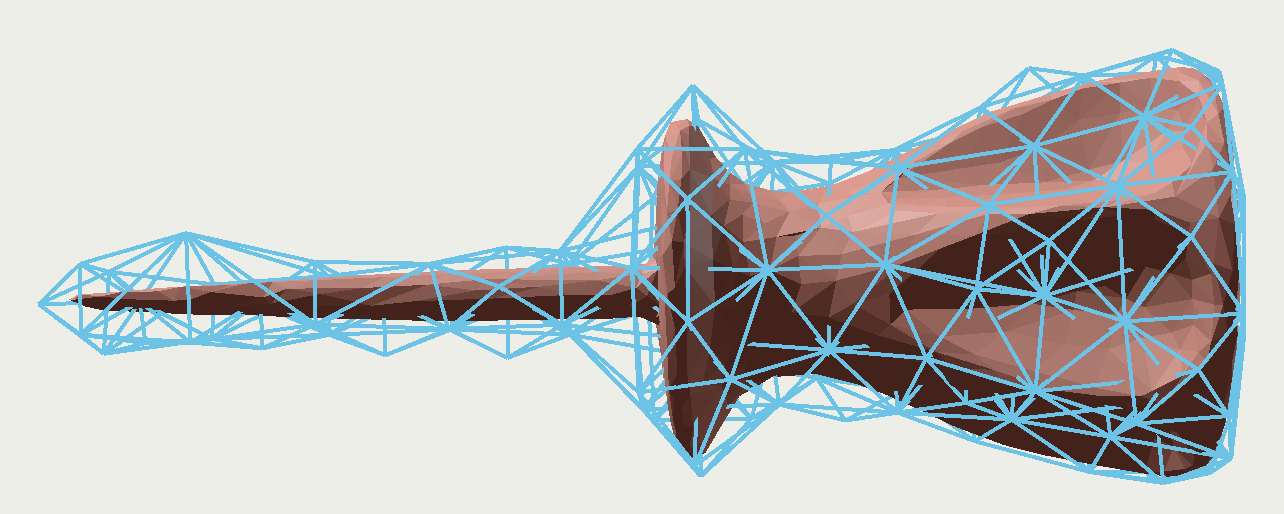
By default, the body still collides through the boundary of its cage, which is as coarse as its cells. Its skin can
become its actual collision mesh instead with
setSkinCollision.
- Example 2D
- Example 3D
// A detailed outline held by a coarse cage of cells (the last `true` argument): only the
// cells are simulated, and the outline (the skin) follows their deformation.
let numSegments = 48;
let circleVertices = new Float32Array(numSegments * 2);
let circleIndices = new Uint32Array(numSegments * 2);
for (let i = 0; i < numSegments; ++i) {
    let angle = (i / numSegments) * 2.0 * Math.PI;
    circleVertices.set([Math.cos(angle) * 0.5, Math.sin(angle) * 0.5], i * 2);
    circleIndices.set([i, (i + 1) % numSegments], i * 2);
}
let skinnedDesc = RAPIER.SoftBodyDesc.volumetric(circleVertices, circleIndices, 0.25, true)
    // Collide through the skin instead of the boundary of the cage.
    .setSkinCollision(true)
    .setTranslation({ x: 0.0, y: 4.0 });
let skinned = world.createSoftBody(skinnedDesc);
// The skin is the body's collision mesh: read its vertices back to render it.
let skinPositions: Float32Array = skinned.meshVertices(0);
console.log("The skin has", skinPositions.length / 2, "vertices");
// A mesh held by a cage of cells (the last `true` argument): only the cells are simulated,
// and the mesh (the skin) follows their deformation.
let skinnedDesc = RAPIER.SoftBodyDesc.volumetric(boxVertices, boxIndices, 0.25, true)
    // Collide through the skin instead of the boundary of the cage.
    .setSkinCollision(true)
    .setTranslation({ x: 0.0, y: 4.0, z: 3.0 });
let skinned = world.createSoftBody(skinnedDesc);
// The skin is the body's collision mesh: read its vertices back to render it.
let skinPositions: Float32Array = skinned.meshVertices(0);
console.log("The skin has", skinPositions.length / 3, "vertices");
A skin doesn't need a computed cage: any mesh can be given as the skin of a body built with cells, with
SoftBodyDesc.setSkin. Each of its
vertices is bound to the cell closest to it, in the pose the cells are built in.
Deformable colliders
The colliders built from the surface or the skin of a soft-body are generated by the engine itself, but it is also
possible to give a body a collider of your own which vertices follow its particles: a deformable collider
(World.createDeformableCollider). This is a polyline in
2D, or a triangle mesh in 3D, flagged as deformable, and attached to the proxy of one of the
clusters of the body (the root body, a cluster itself, can be used too). Its vertices are
given in the frame of
that proxy, and they can be read back at any time in order to render the mesh where the simulation moved
it. A deformable collider can be a sensor as well, e.g., to detect what enters a deformable volume.
How the vertices follow the particles is given by the binding
(SoftMeshBinding):
skinned: each vertex is embedded in the cell of the cluster holding it, i.e., the collider is a skin of the cage.direct: the vertexifollows the particle given for it, which must belong to the cluster. Its alternative that binds every vertex to the closest particle within a given distance (directByPosition) is useful when the mesh is the one the particles were built from.
- Example 2D
- Example 3D
// A deformable polyline bound to the blob: each vertex follows one particle (`direct`),
// or is embedded in the cell holding it (`skinned`). The polyline is given in the frame
// of the proxy it is attached to.
let root = blob.rootBody();
let origin = root.translation();
let num = blob.numParticles();
let vertices = blob.particlePositions();
for (let i = 0; i < num; ++i) {
    vertices[i * 2] -= origin.x;
    vertices[i * 2 + 1] -= origin.y;
}
let indices = new Uint32Array(num * 2);
let particles = [];
for (let i = 0; i < num; ++i) {
    indices[i * 2] = i;
    indices[i * 2 + 1] = (i + 1) % num;
    particles.push(i);
}
let outlineDesc = RAPIER.ColliderDesc.polyline(vertices, indices, RAPIER.PolylineFlags.DEFORMABLE).setSensor(true);
let outline = world.createDeformableCollider(outlineDesc, RAPIER.SoftMeshBinding.direct(particles), root);
// The polyline follows the particles: read its current vertices back.
let meshIndex = blob.meshOfCollider(outline);
let outlineVertices: Float32Array = blob.meshVertices(meshIndex);
console.log("The outline has", outlineVertices.length / 2, "vertices");
// A deformable triangle mesh bound to the jelly: each vertex is embedded in the cell
// holding it (`skinned`), or follows one particle (`direct`). The mesh is given in the
// frame of the proxy it is attached to.
let root = jelly.rootBody();
let origin = root.translation();
let c = jelly.centerOfMass();
let r = 1.0;
let vertices = new Float32Array([
    c.x + r, c.y, c.z, c.x - r, c.y, c.z, c.x, c.y + r, c.z,
    c.x, c.y - r, c.z, c.x, c.y, c.z + r, c.x, c.y, c.z - r,
]);
for (let i = 0; i < 6; ++i) {
    vertices[i * 3] -= origin.x;
    vertices[i * 3 + 1] -= origin.y;
    vertices[i * 3 + 2] -= origin.z;
}
let indices = new Uint32Array([0, 2, 4, 2, 1, 4, 1, 3, 4, 3, 0, 4, 2, 0, 5, 1, 2, 5, 3, 1, 5, 0, 3, 5]);
let skinDesc = RAPIER.ColliderDesc.trimesh(vertices, indices, RAPIER.TriMeshFlags.DEFORMABLE).setSensor(true);
let skin = world.createDeformableCollider(skinDesc, RAPIER.SoftMeshBinding.skinned(), root);
// The mesh follows the particles: read its current vertices back.
let meshIndex = jelly.meshOfCollider(skin);
let skinVertices: Float32Array = jelly.meshVertices(meshIndex);
console.log("The skin has", skinVertices.length / 3, "vertices");
A deformable collider has no mass: its density is ignored, and it is the particles which hold the mass of the soft-body. Note that a collider given no contact skin explicitly gets the particle radius of the soft-body as its skin, so its thickness matches the thickness of the surface of the body.