soft_body_cohesion
Rapier supports three ways of holding the particles of a soft-body together: shape matching, constraints, and the Finite Elements Method (FEM). They can be combined, e.g., shape matching on top of edge constraints. Note that shape matching works on the particles alone, whereas the constraints need edges or cells, and the FEM solver needs cells.
Shape matching
Shape matching doesn't need any element. At each timestep, the rest shape of the body is placed where it best fits its current shape, i.e., both shapes are given the same center of mass, and the rest shape is given the rotation bringing its particles the closest to the current ones. Each particle is then pulled toward its twin in that matched rest shape by a spring:
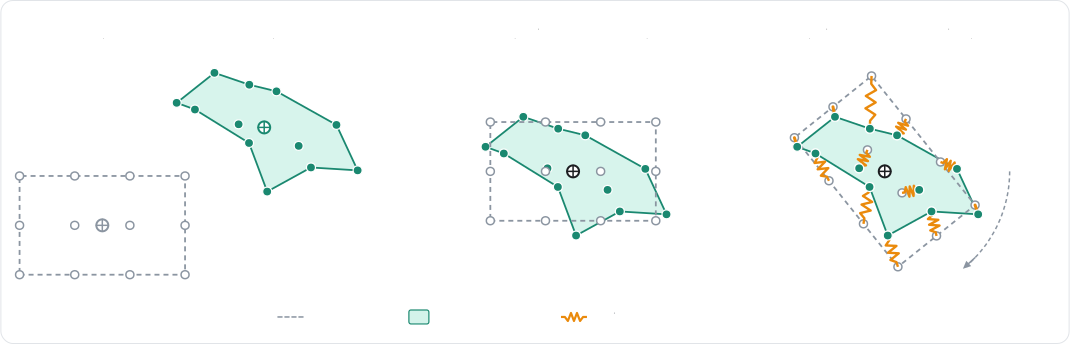
This is cheap, and a body always recovers its original shape whatever the deformation it went through. On the other
hand, the particles don't interact with their neighbors: pushing on one particle doesn't pull the ones around it, which
makes the deformations feel very local. Shape matching is enabled by
SoftBodyDesc.setShapeMatching, and the strength of its
springs is the shape matching softness (shapeMatchingSoftness)
of the material:
- Example 2D
- Example 3D
// A cloud of particles without any element: shape matching alone pulls them back toward
// their rest shape, placed where it best fits the current one.
let points = [];
for (let i = 0; i < 9; ++i) {
    points.push((i % 3) * 0.3, Math.floor(i / 3) * 0.3 + 4.0);
}
let shapeMaterial = new RAPIER.SoftBodyMaterial();
// How fast the particles are pulled back toward their rest shape.
shapeMaterial.shapeMatchingSoftness = { naturalFrequency: 5.0, dampingRatio: 1.0 };
let pointCloudDesc = new RAPIER.SoftBodyDesc(points)
    .setShapeMatching(true)
    .setMaterial(shapeMaterial)
    .setParticleRadius(0.1);
let pointCloud = world.createSoftBody(pointCloudDesc);
// A cloud of particles without any element: shape matching alone pulls them back toward
// their rest shape, placed where it best fits the current one.
let points = [];
for (let i = 0; i < 27; ++i) {
    points.push((i % 3) * 0.3, (Math.floor(i / 3) % 3) * 0.3 + 4.0, Math.floor(i / 9) * 0.3);
}
let shapeMaterial = new RAPIER.SoftBodyMaterial();
// How fast the particles are pulled back toward their rest shape.
shapeMaterial.shapeMatchingSoftness = { naturalFrequency: 5.0, dampingRatio: 1.0 };
let pointCloudDesc = new RAPIER.SoftBodyDesc(points)
    .setShapeMatching(true)
    .setMaterial(shapeMaterial)
    .setParticleRadius(0.1);
let pointCloud = world.createSoftBody(pointCloudDesc);
Use shape matching for low-detail deformations, or whenever computing a topology (edges, cells) isn't desired. It is
enabled by default by the trimesh and polyline constructors. Note however that it performs very poorly for ropes,
cloth, or any open shape. Also note that combining it with edges makes the deformations spread to the neighbors to look
more realistic.
Constraints
The constraints-based soft-body solver is the default solver, and the most versatile one: every edge and cell element of the deformation lattice becomes a constraint, solved together with the contacts and the joints of the scene.

An edge is a spring-damper pulling its two particles back toward its rest length. A cell is either a volume constraint
keeping its area or its volume, the shape itself being held by the edges, or an elastic element resisting any
deformation. This is selected by the cell model of the body
(setCellModel):
Volume: one constraint per cell keeping its area (2D) or its volume (3D) at its rest value. This is the cheapest model, and combined with the edges it is often enough to obtain a convincing jelly.Corotational: linear elasticity expressed in the rotation-free frame of the cell. It is stable at any stiffness and recovers from inverted cells.NeoHookean: stable Neo-Hookean hyperelasticity. It feels stiffer than linear elasticity on compression, but softer on tension.
The stiffness of every element is configured by the SoftBodyMaterial of the body, which can be given to the builder or
set at any time with SoftBody.setMaterial. The edges and the volume constraints are given a softness, i.e., a
natural frequency (in Hz) and a damping ratio instead of a stiffness, so it doesn't depend on the masses of the
particles:
- The edge softness (
edgeSoftness) for the structural edges; - The bend softness (
bendSoftness) for the bending edges and the dihedral constraints; - The volume softness (
volumeSoftness) for the volume constraints.
The elastic cells are given a Young modulus (youngModulus, in force per unit
area in 3D, per unit length in 2D), a Poisson ratio (poissonRatio), and a
damping ratio (elasticDampingRatio) instead. Their natural frequency
is derived from these, therefore a body meshed more finely doesn't become stiffer, whereas it becomes more expensive to
simulate.
Finally, a body with a closed surface can preserve the area (2D) or the volume (3D) it encloses
(setVolumePreservation), which target can be scaled by a
setVolumeFactor
greater than 1 in order to inflate the body, e.g., to simulate a pressurized blob:
- Example 2D
- Example 3D
// Elastic cells: a jelly square with corotational linear elasticity.
let material = new RAPIER.SoftBodyMaterial();
// Stiffness of the elastic cells.
material.youngModulus = 3.0e3;
material.poissonRatio = 0.35;
material.elasticDampingRatio = 0.5;
// Plasticity: the rest shape flows past 5% strain, at 20 per second.
material.plasticYield = 0.05;
material.plasticCreep = 20.0;
// Tearing: an element past 40% strain tears.
material.tearStrain = 0.4;
let jellyDesc = RAPIER.SoftBodyDesc.grid({ x: 3.0, y: 1.2 }, { x: 1.0, y: 1.0 }, 6, 6)
    // The constitutive model of the cells: `Volume` (per-cell area constraints,
    // the shape is held by the edges), `Corotational` or `NeoHookean`.
    .setCellModel(RAPIER.SoftBodyCellModel.Corotational)
    .setMaterial(material)
    .setParticleMass(0.2);
let jelly = world.createSoftBody(jellyDesc);

// A pressurized blob: a ring of particles inflated by area preservation.
let blobDesc = RAPIER.SoftBodyDesc.disk({ x: 0.0, y: 3.0 }, 0.8, 24)
    .setSoftness(20.0, 1.0)
    // Target area multiplier (`> 1` inflates the body); enables area preservation.
    .setVolumeFactor(1.1)
    .setSelfContacts(true);
let blob = world.createSoftBody(blobDesc);
// Elastic cells: a jelly cube with corotational linear elasticity.
let material = new RAPIER.SoftBodyMaterial();
// Stiffness of the elastic cells.
material.youngModulus = 2.0e3;
material.poissonRatio = 0.35;
material.elasticDampingRatio = 0.5;
// Plasticity: the rest shape flows past 5% strain, at 20 per second.
material.plasticYield = 0.05;
material.plasticCreep = 20.0;
// Tearing: an element past 40% strain tears.
material.tearStrain = 0.4;
let jellyDesc = RAPIER.SoftBodyDesc.cuboid({ x: 3.0, y: 1.0, z: 0.0 }, { x: 0.5, y: 0.5, z: 0.5 }, 4, 4, 4)
    // The constitutive model of the cells: `Volume` (per-cell volume constraints,
    // the shape is held by the edges), `Corotational` or `NeoHookean`.
    .setCellModel(RAPIER.SoftBodyCellModel.Corotational)
    .setMaterial(material)
    .setParticleMass(0.2);
let jelly = world.createSoftBody(jellyDesc);

// A material shared by the edges, bending constraints and volume constraints.
let clothMaterial = RAPIER.SoftBodyMaterial.uniform(30.0, 1.0);
// Softness of the bending constraints, on top of the uniform 30 Hz softness.
clothMaterial.bendSoftness = { naturalFrequency: 3.0, dampingRatio: 1.0 };
cloth.setMaterial(clothMaterial);
The stiffness effectively simulated by the constraints solver depends on its convergence: with too few iterations, a stiff
body looks softer than its material says. This is why soft-bodies are configured with 3 additional internal PGS solver iterations by default, which can
be modified with
setAdditionalPgsIterations. The whole island a body belongs to
can also be given additional substeps with
setAdditionalSolverIterations, just like
rigid-bodies.

The following table gathers the settings to look at for the most common problems:
| Problem | What to change |
|---|---|
| The body is too soft, or stretches too much. | Raise the natural frequency of the material's edgeSoftness, or its youngModulus for the elastic cells. Give it more setAdditionalPgsIterations, or switch it to the FEM solver with setSolver. |
| A cloth stretches, but should still fold easily. | Keep a stiff edgeSoftness, and give it a soft bendSoftness. |
| A rope compresses like a spring. | Make its edges resist stretching only with setTensionOnly. |
| The body keeps wobbling after an impact. | Raise the dampingRatio of the material's softnesses and its elasticDampingRatio, or its deformationDamping (which damps the deformations but not the motion of the body as a whole). |
| A closed body collapses, or must be inflated. | Enable setVolumePreservation, and give it a setVolumeFactor greater than 1. |
| The deformations are too local. | Combine setShapeMatching with edges, or rely on edges and cells alone. |
FEM solver
The FEM solver (SoftBodySolver.Fem) resolves the elasticity of the whole body at once and semi-implicitly:
the forces and the stiffness of every cell are assembled into a single linear system, solved at each substep. Therefore
the stiffness of the body no longer depends on the number of solver iterations, which makes it capable of simulating
very stiff materials, as well as more realistic plastic deformations and failures:
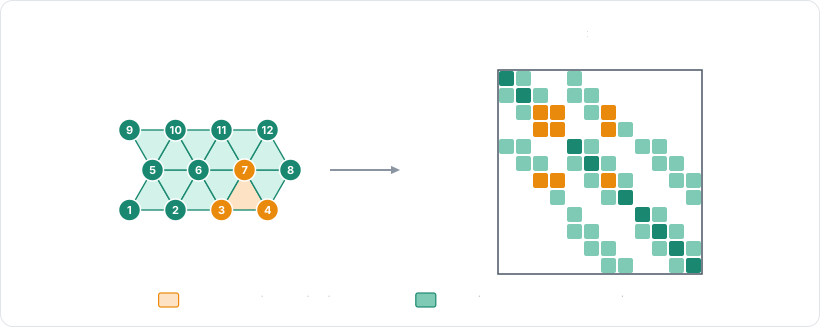
This comes at a price: the system is factorized at each timestep, and every constraint touching the body (contacts,
joints) needs a solve against it. Note that the FEM solver requires cells, so it only applies to the bodies built with
cells, e.g., with the grid, cuboid, or volumetric constructors. The configuration of its linear solves is shared
by every body using it, and lives in the integration parameters:
- Example 2D
- Example 3D
// A stiff beam simulated by the FEM solver: its stiffness doesn't depend on the number of
// solver iterations.
let beamMaterial = new RAPIER.SoftBodyMaterial();
beamMaterial.youngModulus = 1.0e5;
beamMaterial.poissonRatio = 0.3;
let beamDesc = RAPIER.SoftBodyDesc.grid({ x: 0.0, y: 2.0 }, { x: 1.0, y: 0.1 }, 21, 3)
    .setSolver(RAPIER.SoftBodySolver.Fem)
    .setCellModel(RAPIER.SoftBodyCellModel.NeoHookean)
    .setMaterial(beamMaterial)
    // The particles of the side at `x = -1` are the first 3 ones.
    .setPinnedParticles(new Uint32Array([0, 1, 2]));
let beam = world.createSoftBody(beamDesc);

// The tuning of the linear solves of the FEM solver, shared by every body using it.
world.integrationParameters.softBodiesFemLinearTolerance = 1.0e-5;
world.integrationParameters.softBodiesFemMaxLinearIterations = 20;
// A stiff beam simulated by the FEM solver: its stiffness doesn't depend on the number of
// solver iterations.
let beamMaterial = new RAPIER.SoftBodyMaterial();
beamMaterial.youngModulus = 1.0e5;
beamMaterial.poissonRatio = 0.3;
let beamDesc = RAPIER.SoftBodyDesc.cuboid(
    { x: 0.0, y: 2.0, z: -3.0 }, { x: 1.0, y: 0.1, z: 0.1 }, 11, 3, 3,
)
    .setSolver(RAPIER.SoftBodySolver.Fem)
    .setCellModel(RAPIER.SoftBodyCellModel.NeoHookean)
    .setMaterial(beamMaterial)
    // The particles of the face at `x = -1` are the first 3 × 3 ones.
    .setPinnedParticles(new Uint32Array([0, 1, 2, 3, 4, 5, 6, 7, 8]));
let beam = world.createSoftBody(beamDesc);

// The tuning of the linear solves of the FEM solver, shared by every body using it.
world.integrationParameters.softBodiesFemLinearTolerance = 1.0e-5;
world.integrationParameters.softBodiesFemMaxLinearIterations = 20;
The linear solves stop at the relative residual
softBodiesFemLinearTolerance, or after
softBodiesFemMaxLinearIterations conjugate-gradient iterations,
whatever the residual. The bodies with at most
softBodiesFemMaxDenseDofs degrees of freedom (600 by default) are
factorized directly, whereas the larger ones rely on the iterative conjugate gradient.
Use the FEM solver for stiff materials which simulated stiffness must not depend on the iteration count, e.g., the chassis of a car or a metal beam. This also results in more realistic plasticity and tearing.